EasyManua.ls Logo

Arizer Air MAX - Dark Mode Operation

Arizer Air MAX
17 pages
Print Icon
To Next Page IconTo Next Page
To Previous Page IconTo Previous Page
Loading...
Set the
t
e
mperature
27
Pres
s
and
ho
l
d
Menu (M)
and
Minus(-
)
B
u
tt
ons
J
I
nsert Glass
A
r
oma
T
ube
[
Da
r
k
Mod
e
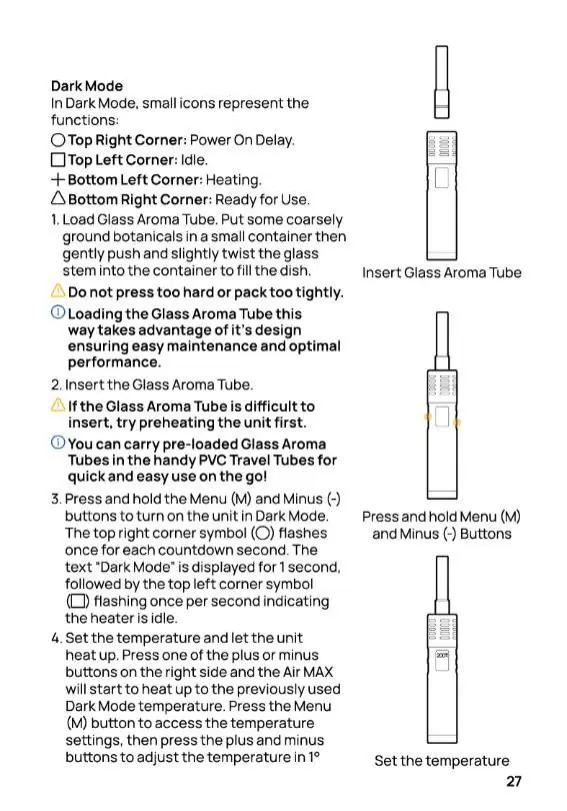
In Dark
Mode
,
small
i
cons
represe
nt
the
func
t
i
ons
:
0
Top Right
Corne
r:
P
ow
e
r On
De
la
y
.
O Top
l
eft
Corn
e
r
: I
dle
.
+
Bottom
Left
Corner,
H
ea
ti
ng
.
6
Bottom Right
Corne
r
:
Rea
d
y
for
Use
.
1
.
L
oad Glass Aroma
Tube
.
Put some
coarse
l
y
gro
u
nd
botan
i
cals in
a
sma
ll
c
on
t
a
i
ner
t
h
en
gen
t
l
y push and
s
li
ghtly twist
th
e
g
l
ass
stem
into
t
he
con
t
a
i
ner
to
f
i
ll
the
d
i
sh
.
Do
not
press
too
ha
r
d
or pack
t
oo
tight
l
y.
<D
loading
t
he
G
l
ass
A
rom
a
Tu
b
e
t
h
i
s
way
t
akes
advan
t
age
of
i
t
'
s
des
i
gn
ensuring
e
asy
main
t
e
nance
an
d
opt
i
ma
l
performance
.
2
.
Insert
the
G
l
ass
Ar
oma
Tu
be
.
I
f the
Glass
Aro
m
a
Tube
i
s
difficult to
in
se
r
t
.
try
preh
e
ating the
u
nit
fi
r
st
.
<D
Y
ou can
ca
r
ry
pre
-
loaded
G
l
ass
A
roma
Tubes in
t
he handy PVC Travel Tubes
for
quic
k and easy use on
the
go
!
3
.
P
ress
an
d
ho
l
d
the
Menu
(
M
) and
M
i
nus(
-
)
bu
tt
ons
t
o
t
urn on
t
he
u
n
i
t
in Dark
Mode
.
T
he top right corner symbol
(0)
f1
ashes
once
for
each countdown
secon
d
.
T
he
tex
t
·
oark
Mode
"
i
s
d
i
sp
l
ayed
f
o
r
1
second
.
f
o
ll
owed by
t
he
to
p
l
eft
corner
symbo
l
(D
)
f1ash
i
ng once
pe
r second
i
nd
i
cat
i
ng
the
h
eater
i
s
i
d
l
e
.
4
.
Set the
tem
p
era
tu
re and
le
t the
u
n
i
t
heat
up
.
P
ress one of the plus or
m
i
n
u
s
buttons on the
r
i
ght
s
i
de
a
n
d
the
Ai
r
MA
X
w
i
ll
start to
hea
t
up
t
o
the
prev
i
ously
u
sed
Dark Mode
tempera
t
ure.
P
ress the
M
en
u
(
M
) button
to
access
the
temperatu
r
e
setti
n
gs
,
the
n press
the
p
l
us and
m
i
nus
buttons
to
adjust
t
he
tem
p
era
t
u
r
e
i
n
1
°

Related product manuals