EasyManua.ls Logo

Armacost Lighting 523420 - User Manual

Armacost Lighting 523420
2 pages
Print Icon
To Next Page IconTo Next Page
Loading...
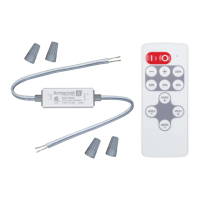
Slimline Single Color LED Controller
With RF Remote Control
Model # 523420
Introduction
This LED controller is designed to drive constant
voltage single color LED products such as LED tape
light or LED fixtures in a voltage range of 5–24
volts DC. The receiver works with the RF wireless
remote control, which allows the user to adjust
LED brightness and select dynamic effects.
Receiver & wiring
38mm
15mm
50mm
1 2
1. Input – from power supply
The controller input and output voltage range is
5–24 volts DC. Make sure the LED lighting voltage is
within this range and below the rated wattage of the
power supply. Connect input wires from the power
supply to the controller as indicated by the polarity
markings on the controller (+ to + and – to –).
2. Output – to LED lighting
Observe polarity indicated on the controller when
connecting to LED lighting (+ to + and – to –).
Make sure the voltage of the LED lighting is the
same as the power supply and the maximum
load doesn’t exceed that of the controller.
CAUTION: Shorting of output cables could cause
permanent damage to controller. Make sure
cables are well insulated from each other.
3. Wiring diagram
Connect the power supply to the controller input
and the controller output to the LED lighting.
The output voltage of the power supply must
be the same as the voltage of the LED lighting.
Make sure all power cables are conected
securely and insulated before powering on.
Remote
Control
LED
Controller
5–24V DC
Output
Power Supply
5–24V DC 5–24V DC
100/230V
AC Power
LED
Lighting
Remote Control
5
6
4
7
25%
4. On / Off
Press the “|” key to turn on controller or the “0”
key to turn off. The controller will remember
the controller state when powered off, and will
return to that state when powered back on.
5. Brightness adjustment
Press the “+” and “–” keys to adjust brightness
or press the 100%, 50%, 25%, and 10% keys
to jump to the specific brightness level.
1
2 3
Wireless Remote
Ultra Compact
Wide Voltage Range
Memory Function
Overheat Protection

Other manuals for Armacost Lighting 523420

Question and Answer IconNeed help?

Do you have a question about the Armacost Lighting 523420 and is the answer not in the manual?

Summary

Introduction

Receiver & Wiring

Input - from power supply

Connects power supply input wires to controller, ensuring correct polarity (+ to + and – to –).

Output - to LED lighting

Connects output wires to LED lighting, observing polarity (+ to + and – to –) on controller.

Wiring diagram

Illustrates connecting power supply to controller input and controller output to LED lighting.

Remote Control Functions

On; Off

Press 'I' to turn on or '0' to turn off. Controller remembers last state upon power cycle.

Brightness Adjustment

Use '+' and '-' keys or percentage keys (100%, 50%, 25%, 10%) to adjust brightness.

Dynamic Effects

Use 'MODE+' and 'MODE-' for effects, 'SPEED+' and 'SPEED-' to adjust effect speed.

Remote Indicator

Indicator blinks when remote works. Slow blink indicates low battery (CR2032).

Remote Control Operation

Using the Remote Control

Pull out battery tab before use. RF remote works through walls. Do not install in metal enclosure.

Pairing with a New Remote

Up to 5 remotes can pair to one receiver. Follow specific disconnect/reconnect and button press steps.

De-pairing Remotes

Pair the desired remote with the controller. Any other paired remotes will be de-paired.

Overheat Protection

Specifications

Customer Support & Warranty

Armacost Lighting 523420 Specifications

General IconGeneral
BrandArmacost Lighting
Model523420
CategoryController
LanguageEnglish

Related product manuals