Need help?
Do you have a question about the Armacost Lighting 723421 and is the answer not in the manual?
Connect input wires from power supply to controller, observing polarity. Ensure voltage matches.
Observe polarity when connecting to LED lighting (G to G, R to R, B to B).
Press the "I" key to turn on controller or the "0" key to turn off. Controller remembers state.
Use "COLOR+" and "COLOR-" keys to scroll through colors. Colored keys are shortcuts. Adjust brightness with +/- keys.
Press "MODE+" and "MODE-" to select effect mode, "SPEED+" and "SPEED-" to adjust speed.
Indicator blinks if remote works. Slow flash indicates low battery (CR2032).
Pull battery tab. RF remote works through walls/doors. Avoid metal enclosures.
Pair up to 5 remotes. Disconnect power, reconnect, press "SPEED-" & "SPEED+" to initiate pairing.
Pair the desired remote with the controller. Other paired remotes will be de-paired.
Contact via email (support@armacostlighting.com) or phone (410-354-6000) during business hours.
Limited 1-year warranty for dry location use. Improper installation or abuse voids warranty.
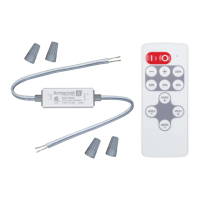
The Armacost Lighting Slimline RGB Color LED Controller with RF Remote Control is designed to manage constant voltage RGB LED products, such as LED tape light or LED fixtures, operating within a voltage range of 5–24 volts DC. This system allows users to select from multiple colors, adjust LED brightness, and choose dynamic lighting effects using a wireless remote control.
The core function of this device is to provide precise control over RGB LED lighting. It acts as an intermediary between a power supply and the LED lighting, translating commands from the RF wireless remote into appropriate electrical signals for the LEDs. The controller supports a wide voltage range, ensuring compatibility with various LED setups.
The receiver unit is compact, measuring approximately 50mm in length and 15mm in width, making it suitable for installations where space is limited. It features clear input and output connections. For input, wires from the power supply are connected, observing polarity (+ to + and – to –). For output, the controller connects to the LED lighting, again with careful attention to polarity (+ to +, G to G, R to R, and B to B). It is crucial to ensure that the voltage of the LED lighting matches the power supply's output voltage and that the maximum load does not exceed the controller's capacity. Shorting output cables can cause permanent damage, so proper insulation is essential.
The RF wireless remote control is designed for ease of use and offers a comprehensive set of controls. It operates through walls and doors, eliminating the need for line-of-sight, though it should not be installed in a metal enclosure. Before initial use, a plastic battery insulation tab must be removed.
The remote features dedicated "I" (on) and "0" (off) keys. The controller has a memory function, meaning it will retain its last state (on or off, and the last lighting setting) when powered off and return to that state when powered back on.
Users can scroll through all available color options using the "COLOR+" and "COLOR-" keys. Additionally, the remote includes several colored keys that serve as shortcuts for preset colors, allowing for quick selection. The brightness of the selected color can be adjusted using the and keys.
The controller offers various dynamic lighting effects. These can be selected using the "MODE+" and "MODE-" keys. Once an effect is chosen, its speed can be adjusted with the "SPEED+" and "SPEED-" keys. A "DEMO" key is also available to play through the dynamic effects, providing a preview.
Beyond remembering its on/off state, the controller also retains the last selected color or dynamic effect and its brightness/speed settings, ensuring a consistent user experience upon reactivation.
The remote control and receiver are pre-paired from the factory. However, the system supports pairing up to five remotes to a single receiver. To pair a new remote, the user must disconnect power to the receiver for five seconds, then reconnect power for ten seconds, and finally press the "SPEED–" and "SPEED+" keys simultaneously on the new remote for about three seconds until its indicator flashes quickly. To de-pair remotes, the user should pair the remote they wish to continue using with the controller; this action will automatically de-pair any other previously paired remotes.
The remote control includes an indicator light. When keys are pressed, a blinking light confirms proper operation. If the indicator flashes slowly, it signals low battery power, indicating that the CR2032 battery needs replacement.
The controller is equipped with an overheat protection feature. If the device's internal temperature rises to an unsafe level, it will automatically shut down to prevent damage. Once the temperature drops to a safe range, it will resume normal operation. If this occurs, it is advisable to check that the output current is below the rated level to prevent recurrence.
The device is designed for dry location use only. Proper installation and adherence to the specified voltage and load limits are crucial for its longevity. Any improper installation, powering, abuse, or failure to use the device for its intended purpose will void the warranty.
 General
| Model Number | 723421 |
|---|---|
| Category | Controller |
| Brand | Armacost Lighting |
| Wireless Frequency | 2.4 GHz |
| Output Voltage | 12V DC |
| Operating Temperature | -20°C to 60°C |


 To Next Page