Page 3For technical questions, please call 1-888-866-5797.Item 57326
Setup - Before Use:
Read the ENTIRE IMPORTANT SAFETY INFORMATION section at the beginning of this document
including all text under subheadings therein before set up or use of this product.
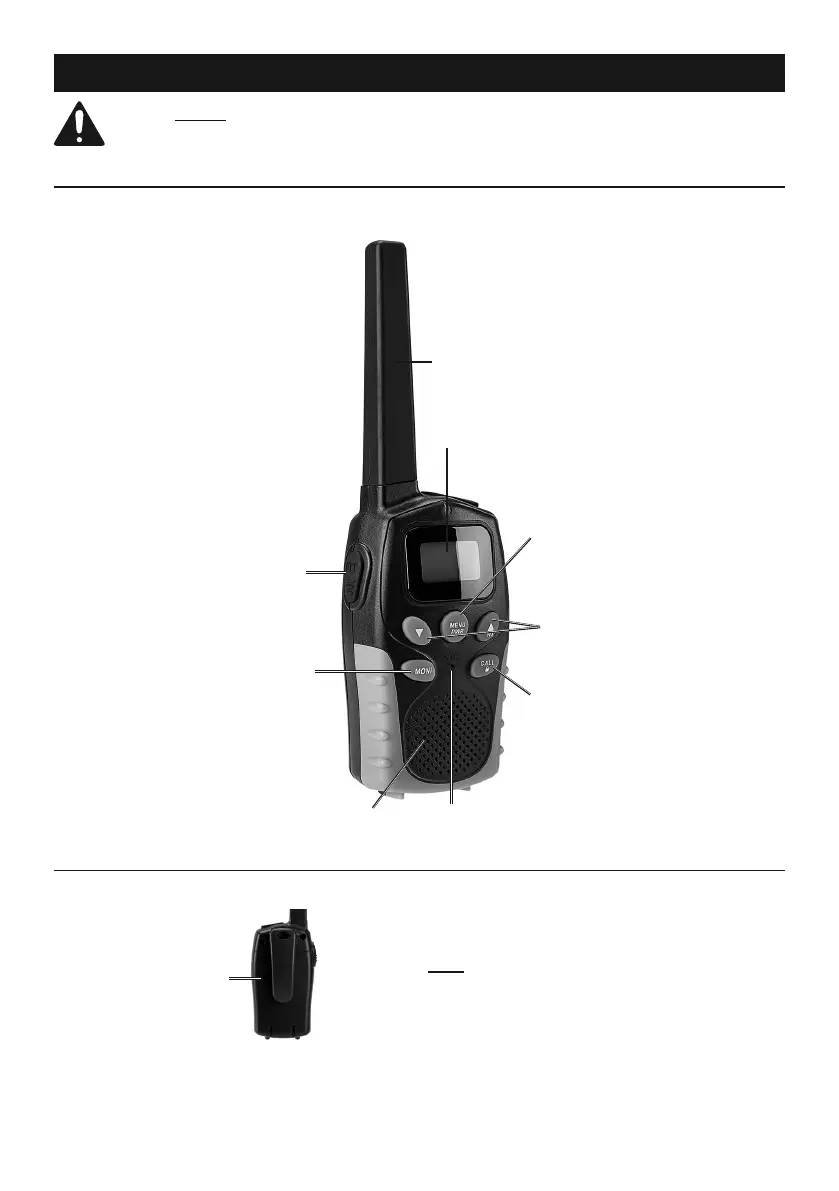
Functions
Antenna
LCD Display
Transmit
Button
Monitor
Button
Call
Button
Speaker
Power/Menu
Button
Volume
Buttons
Microphone
Battery Installation
1. Slide battery compartment cover down to open it.
Battery
Compartment
2. Insert four AAA batteries (included) into battery
compartment, following indicated polarity.
3. Slide cover back into place until it clicks securely.
Note: The ‘Battery’ icon is displayed in the bottom
left corner of the display screen. When battery power
drops to ‘low,’ the radio will emit an alert beep. When
‘Battery’ icon appears empty and starts flashing,
the display screen will shut off 30 seconds later.


 To Next Page