Page 6 @+-*)/93='91<*A,/()'+=(B*4</1(/*91<<*CDEEEDE!!D$%F%6 Item 64357
GH@;IJ KLGIHMMHIKNL OHPIG*MKGI
T+,=)*I&*O<1)/*)+*I&*
RHPLKLSY I+*-/>,9/*-'(`*+7*/</9)-'9*(3+9`B*,=4<,8*I&*0/7+-/*)3-/1>'=8*0+<)(*'=)+*I&a(*019`*41=/<6**
LNIKQ;2 Consult TV owner’s manual before attaching this Mount. Harbor Freight Tools is not responsible for
damage caused by failure to follow TV mounting instructions, improper installation, or improper/loose hardware.
1. Cover TV screen with a towel or other soft material
and tilt it against the wall or another solid surface.
V+*=+)*<1W*I&*719/*>+.=6
2. Consult TV Owner’s Manual to determine TV’s
VESA mounting pattern and hardware requirements.
3. Mounting Hardware:
a. Use mounting hardware that came with the TV, or
b. If the TV did not come with mounting hardware,
select from included TV Bolts, TV Washers and
TV Spacers (see Parts List on page 11).
RHPLKLSY**I+*4-/b/=)*(/-'+,(*'=X,-WB*>+*=+)*,(/*
31->.1-/*)31)*>+/(*=+)*:1)93*)3/*I&a(*31->.1-/B*
)31)*'(*)++*<+=8*+-*)++*(3+-)B*+-*+b/-)'83)/=*
)3/*31->.1-/6**V+'=8*(+*:1W*>1:18/*)3/*
I&B*9-/1)/*1*(3+9`*31c1->*0W*/</9)-'7W'=8*)3/*
31->.1-/5:+,=)B*1=>5+-*91,(/*)3/*I&*)+*71<<6
4. Select Mounting Instructions below
according to TV’s mounting pattern.
T+,=)'=8*K=()-,9)'+=(*7+-*&;GH*Cdd*\*CddB*_dd*\*CddB*_dd*\*_dd
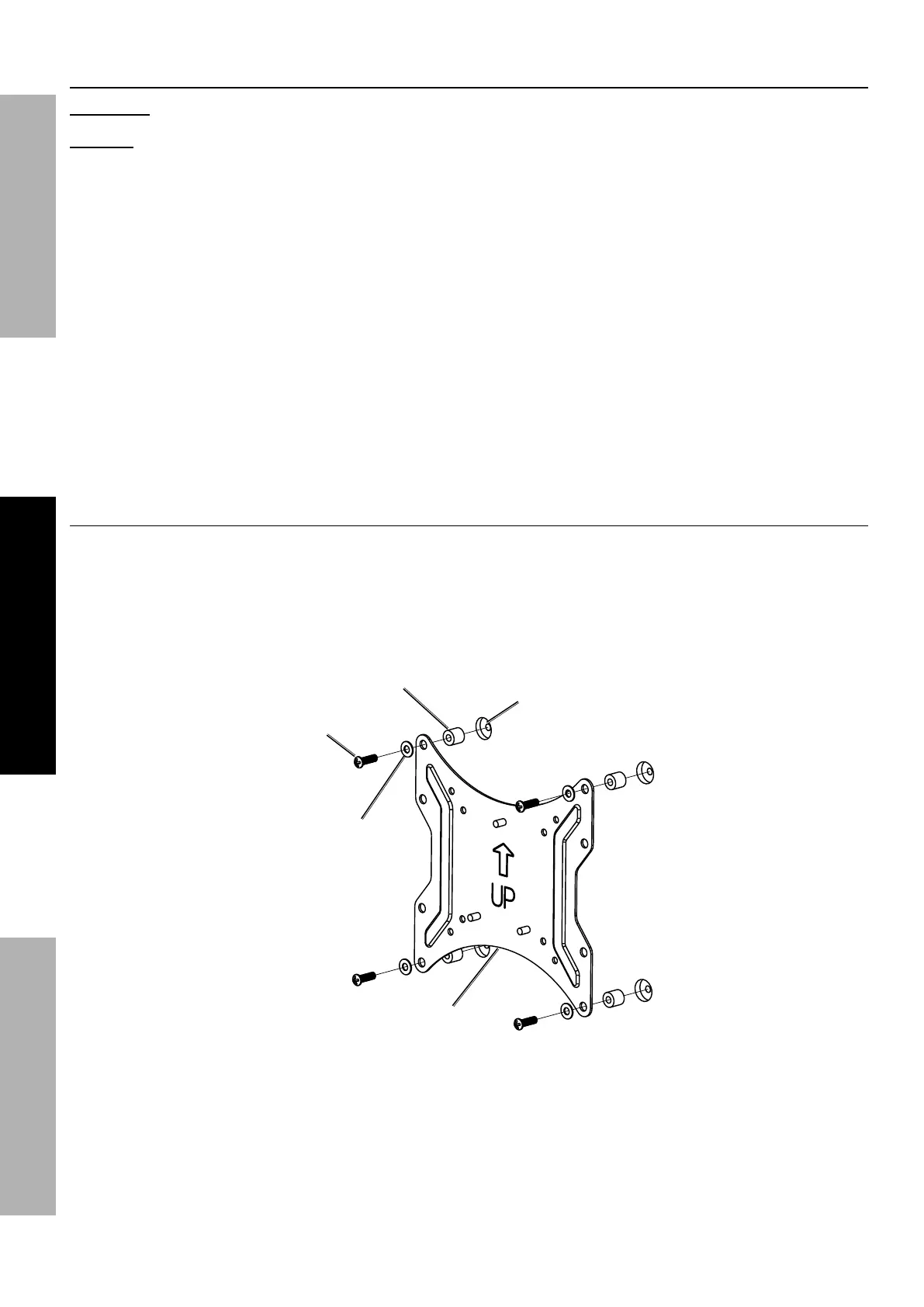
Attach TV Plate (2) to Mounting Holes on TV using appropriate TV Bolts
and TV Washers. Use TV Spacers if necessary.
I&*G419/-*]C#*+-*C"^
]'7*=/9/((1-W^
I&*O<1)/*
]_^
T+,=)'=8*
Z+</*+=*I&
I&*R1(3/-
]Cd*D*C_^
I&*U+<)
]"*D*F^


 To Next Page