ARTURIA – PROPHET V - MANUAL
39
4.2.1 Choice of a bank, sub-bank, preset
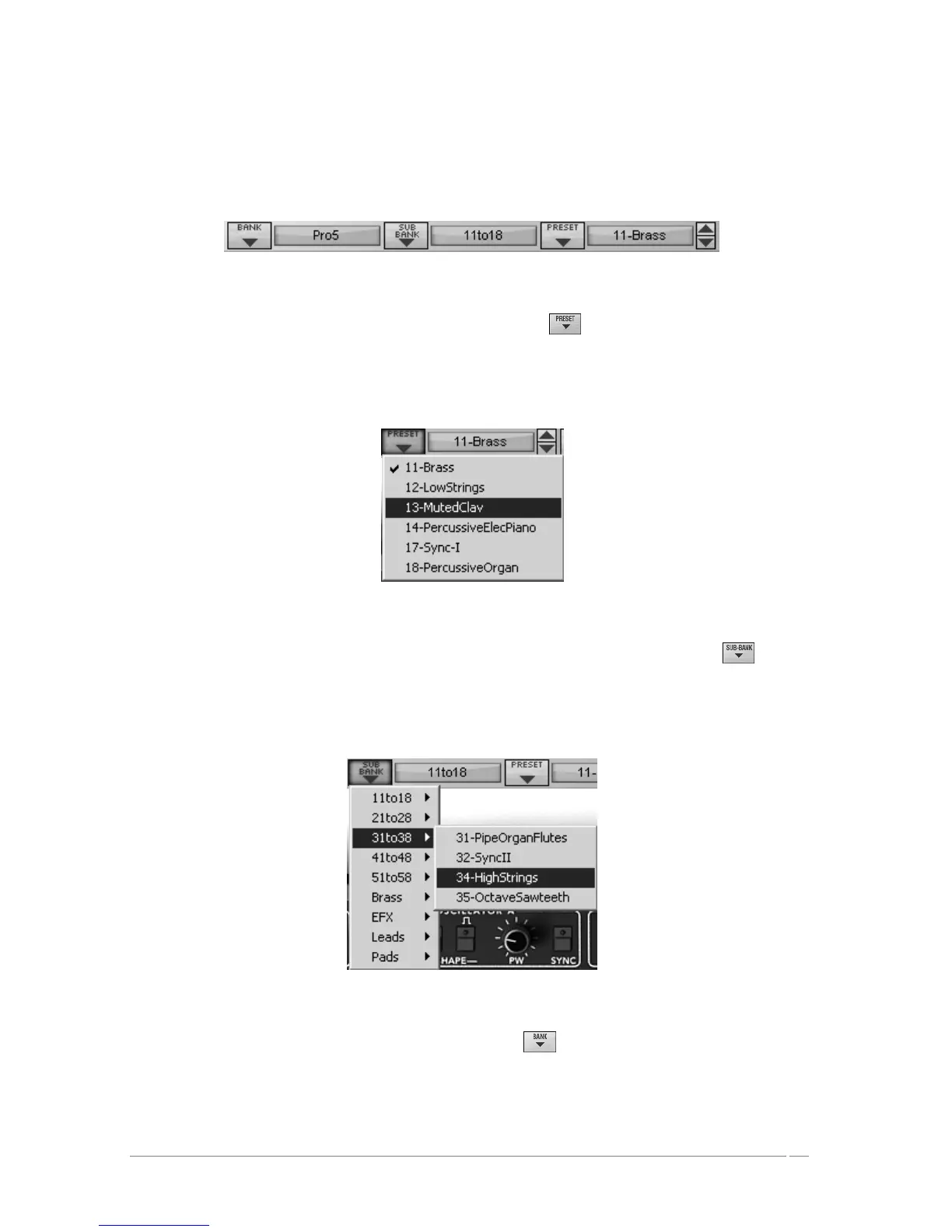
The bank, sub-bank and preset in use by the Prophet V are permanently displayed in the
synthesizer tool bar.
Display of current bank, sub-bank and preset
To choose a preset in the current sub-bank, click on the button, and a drop-down menu
appears with a list of the presets of the same sub-bank. You can choose another preset by
selecting the corresponding line in the drop-down menu. As soon as the preset has been chosen,
you can play the new sound on your MIDI keyboard or from your sequencer.
Choice of a preset in the same sub-bank
To choose a preset in the same main bank, but a different sub-bank, click on the button,
and a drop-down menu appears with a list of the sub-banks contained in the same main bank.
Each sub-bank listed in the menu allows you to open a sub-menu containing its presets. A click
on a preset allows you to directly choose a preset in the new sub-bank.
Choice of a preset in another sub-bank
To choose a preset in another main bank, click on the button. A dropdown menu appears
with a list of the main banks available with the sub-banks corresponding to the sub-banks
defined in each main bank and to the presets contained in each sub-bank. You can thus freely
choose a preset by clicking on its name.














 To Next Page