Need help?
Do you have a question about the ASCOM i63 VoWiFi and is the answer not in the manual?
Press and hold the End key until the handset is switched on.
Press and hold the End key until Switch off? is displayed, then press Yes.
Place the handset in the desktop charger or charging rack and gently push it down.
Explanation of icons used in the handset's menu interface.
Details on the functions and programming of soft keys, hot keys, and the multifunction button.
Instructions on how to enter and move through the menu structure.
Instructions for making, answering, ending, and rejecting calls.
Adding, editing, searching, and deleting contacts in local and central phone books.
Receiving, reading, sending, and deleting text messages.
Adjusting call volume, key lock, and replacing the handset battery.
Configuration and usage of the alarm button for sending alerts.
Details on automatic man-down and no-movement detection alarms.
Temporarily delaying alarms, resetting functions, and acoustic location signals.
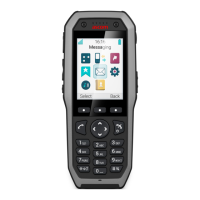
The Ascom i63 VoWiFi Handset is a robust communication device designed for use in demanding environments, offering a wide array of features including telephony, messaging, and alarm functions. This quick reference guide outlines its basic functionality and maintenance aspects.
The handset provides comprehensive communication capabilities over a Voice over Wi-Fi (VoWiFi) network. Its core functions include making and receiving calls, managing contacts, and sending/receiving text messages. The device features a 2.0-inch TFT full-color display with backlighting, ensuring clear visibility of information.
For telephony, users can dial numbers directly, select contacts from a local or central phone book, or choose from a call list. The handset supports answering, ending, and rejecting calls. During a call, the volume can be adjusted using dedicated buttons or the navigation key. The loudspeaker can be toggled on/off, and the microphone can be muted. The device also includes quick access to voicemail.
Messaging functionality allows users to send and receive text messages. New messages are indicated by an icon on the display and an audible tone. Messages are stored in an inbox and can be viewed, written, and deleted. The availability of messaging features may vary depending on the handset variant.
Alarm functions are a critical aspect of the Ascom i63, particularly for the Protector variant. The multifunction/PTT/Alarm button can be configured for different alarm types. A long press or double press can trigger a push-button alarm, which is sent to a central alarm system. The handset also supports Man-down and No-movement alarms. The Man-down alarm activates if the handset is tilted beyond a predefined angle for a certain period, while the No-movement alarm triggers if no movement is detected for a specified duration. During the warning phase for these alarms, the handset provides audio and vibrating signals and displays a warning message, allowing the user to cancel the alarm before it is sent. Once an alarm is sent, the handset confirms it with a beep and vibrating alert. An Acoustic Location Signal (ALS) can follow an alarm, providing an audible signal from the handset for a predefined period, which can be silenced.
The Ascom i63 is designed for intuitive use with a combination of physical keys and a clear display.
Maintaining the Ascom i63 involves charging the battery and ensuring its chemical resistance.
 General
| Technology | VoWiFi (Voice over Wi-Fi) |
|---|---|
| Frequency Range | 2.4 GHz, 5 GHz |
| Operating Range | Up to 300 meters outdoors, 50 meters indoors |
| Battery Life | Up to 10 hours talk time |
| Supported Networks | IEEE 802.11 a/b/g/n/ac |
| Security | WPA/WPA2-PSK |
| Additional Features | HD voice, Call transfer, Conference calling, Integrated speakerphone |
| Weight | 135 grams |

 To Next Page