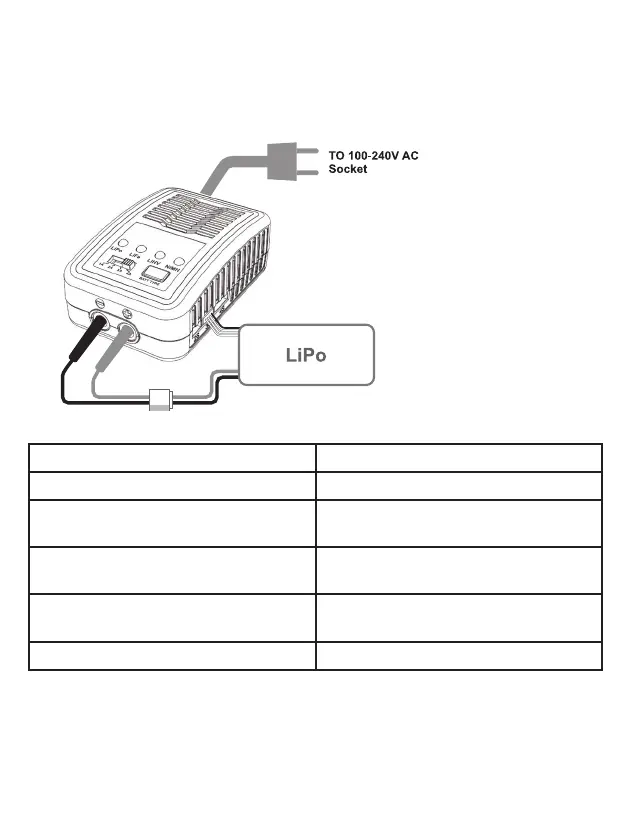
Charging LiPo/LiFe/LiHV Battery
Connect the battery main charge lead to battery socket which is in the front side of the char-
ger and battery balance wire to balance port which is in the right side of the charger.
The charger starts charging. The charge status LED will glow to indicate charging is in prog-
ress.
EXPLANATION OF LED STATUS
LED green and red blinking The charger is ready to charge.
LED glows constant red Battery capacity is less than 25% charged.
LED blinking red Battery capacity is between 25% to 50%
charged.
LED blinking yellow Battery capacity is between 50% to 75%
charged.
LED blinking green Battery capacity is between 75% to 99%
charged.
LED glows constant green Battery is fully charged.
When the battery is fully charged, the charge status LED will glow constant green. Unplug
the battery from the charger and the charge status LED will flash green which indicates the
charger is ready to charge another battery.


 To Next Page