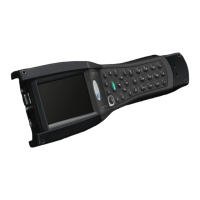
Rev 3 Page 53
1) Powers collector ON.
2) Displays the Main menu.
When entering character string data, changes lower to upper case.
Move to previous menu action.
Displays menu for Descriptors, Characteristic Review and Torque Curve
selections.
1) Go to the Data Entry screen.
2) While collecting data, pressing the data key displays assigned image.
Displays the Select Menu, allowing you to select a setup or characteristic.
While collecting data, displays a prompt to jump to a specified characteristic
for data collection.
1) Selects item from a list or menu.
2) Opens or closes an input box.
3) Toggles an option.
4) Triggers a gage reading in data entry or test.
5) Selects and inputs characters.
Moves a selection cursor to the previous field in a menu or list.
Moves the selection cursor to the next field in a menu or list.
1) Move the selection cursor to the left while in a menu.
2) Move the cursor one character to the left in an input box.
1) Moves the selection cursor to the right while in a menu.
2) Moves the cursor one character to the right in an input box.
1) While collecting data, move to the next cell in data collection sequence.
2) When reviewing an item, move to the next operation.
3) When reviewing data move to the next characteristic.
4) When an input box is displayed, close and enter the input string.


 To Next Page
 Loading...