Rev 3 Page 72
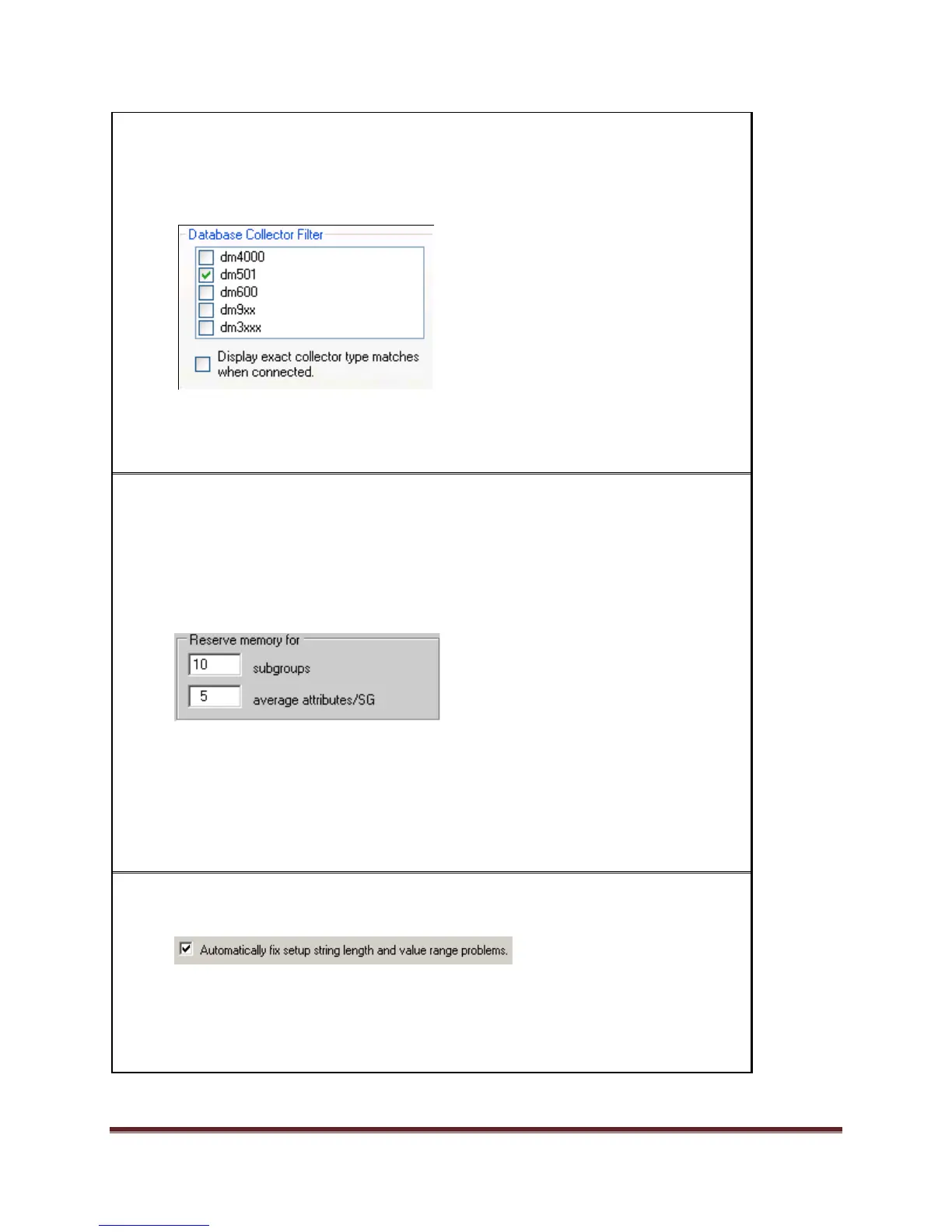
11) Select the Database Collector Filter for the types of setups to display in the
DataMetrics RCSL main window. For example, if you only want to see the setups
designed for a 501 data collector, you would place a checkmark in the 501
checkbox.
Note: The "Display exact collector type" checkbox is used to automatically select
the collector type of the currently connected data collector as the active filter.
12) Users can decide how much space to hold in reserve to store collected data for
each setup in the collector (this setting affects all setups in the collector). Once
this space is reserved, nothing else can use this portion of memory. In setting
this parameter, users should consider how many setups need to be stored on the
collector, how many subgroups are collected in the most frequently used setup
and how often the data is moved to the database.
Set the subgroups to 10. The average attributes/SG setting reserves the memory
for attribute data collection. Set average attributes/SG to 5.
Note: If doing attribute data collection on a 30xx/9xx, change the reserve
memory for average attribute/SG to 5.
13) To Automatically fix setup string length and value range issues (truncate) to ASI
DataMyte's data collector limitations, place a checkmark in the box.
Note: Selecting this will truncate string lengths for your setups and log
information in the RCSL.log file. If unchecked, you will see a message indicating
that the string is too long and must be corrected before you can download.


 To Next Page
 Loading...