EN 21
Plus menu
Touch the Plus key to choose extra functionality (after you have chosen a main function and
settings).
• Select a function by turning the selection knob and confirm with the confirm key.
• To exit the plus menu, touch the ‘stop key’ or ‘plus key’; the display will show the previous
screen again.
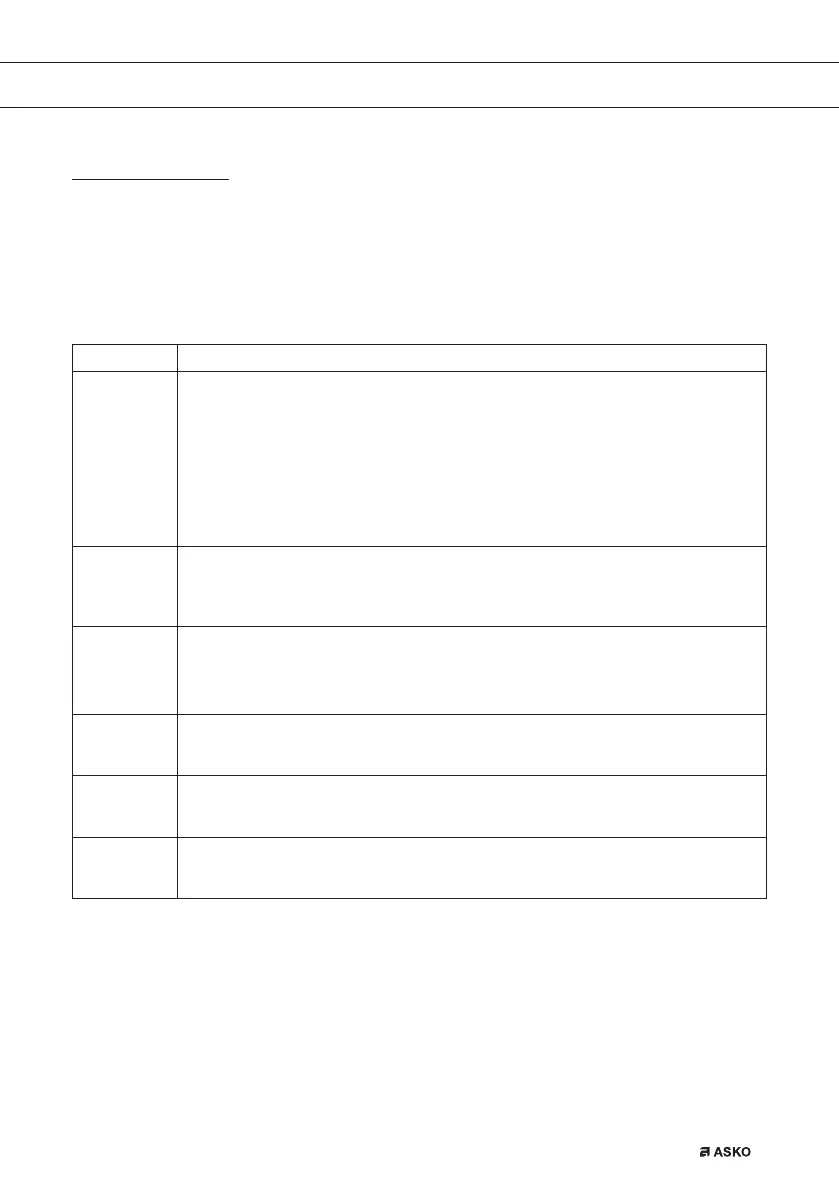
Plus Menu Description
Egg timer
The egg timer can be used independently of the oven function.
• When the egg timer goes off, a message pop-up will appear and an acoustic
signal will sound.
• Touch the stop key to switch off the signal and close the pop-up menu.
• The sound will stop automatically after approximately two minutes.
• To cancel the timer, set the time to 0:00.
Fast preheat
Switch default fast preheat on/off (only available in oven functions).
Add steam 123
• Divide up to three steam cycles evenly over the cooking process.
• Only available when a cooking time has been set.
• Choose at least 10 minutes cooking time.
Add direct steam
• Add a steam cycle to the cooking process.
Cancel steam 123
• If the function is activated.
Cancel direct steam
• If the function is activated.
Starting with fast preheat
• When a program is started and fast preheat is set default ‘on’ in the settings menu,
a pop-up will appear. After 15 seconds the pop-up will automatically disappear.
The progress screen will show the fast preheat icon, the time will be greyed out.
• If the set temperature is reached a message will pop-up. Insert the dish and the program will
start automatically when the door is closed.
USE
687728_en_naslovnica_drug_papir.indd EN21687728_en_naslovnica_drug_papir.indd EN21 8. 08. 2022 11:40:348. 08. 2022 11:40:34



 To Next Page