EasyManua.ls Logo

Asko OP8636S - Control Unit Overview; Control Unit Buttons and Knobs

Asko OP8636S
44 pages
Print Icon
To Next Page IconTo Next Page
To Previous Page IconTo Previous Page
Loading...
6
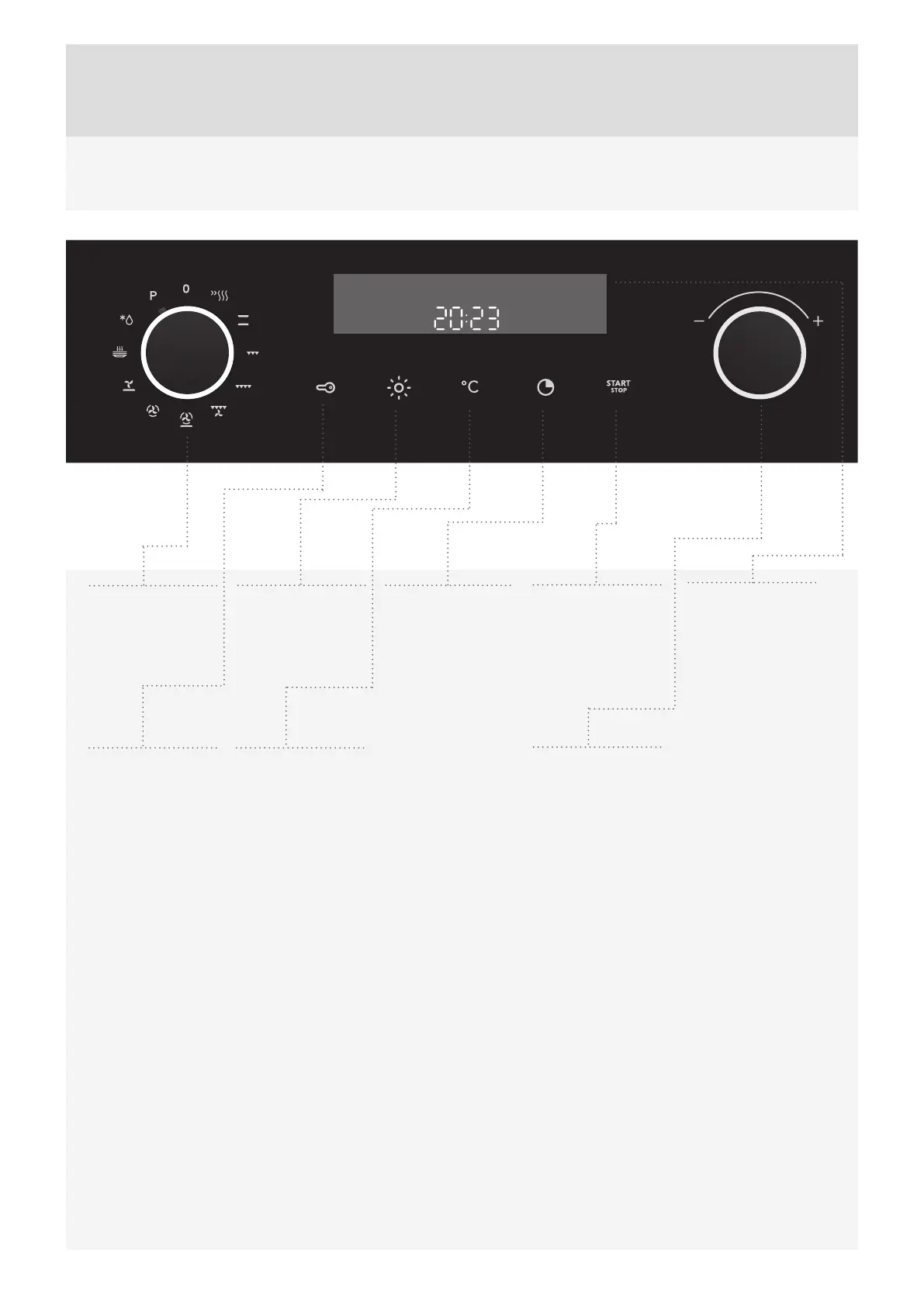
CONTROL UNIT (DEPENDING ON THE MODEL)
16
1
COOKING
SYSTEM
SELECTOR KNOB
NOTE:
The keys will respond better if you touch them with a larger area of your ngertip. Each time you press a key, this will be
acknowledged by a short acoustic signal.
Symbols of cooking systems may be located on the knob or on the front panel (depending on the appliance model).
2
CHILD LOCK
KEY
3
OVEN
LIGHTING
ON/OFF KEY
4
TEMPERATURE
KEY
5
ELECTRONIC
TIMER KEY
Cooking duration
End of cooking
Alarm
Clock
6
START/STOP
KEY
Use this key to start
or stop a program.
7
SETTINGS
KNOB (-/+)
Use this knob to
set the time and
temperature.
8
COOKING
INFORMATION
AND CLOCK
DISPLAY

Related product manuals