84
MAKING YOUR OWN DRYING PROGRAMS (T760/780)
You can make your own drying programs that
would perhaps suit your own needs better than
the four preset programs.
You can always get the preset programs back
again. See the heading "Restoring preset drying
programs" at the end of this section.
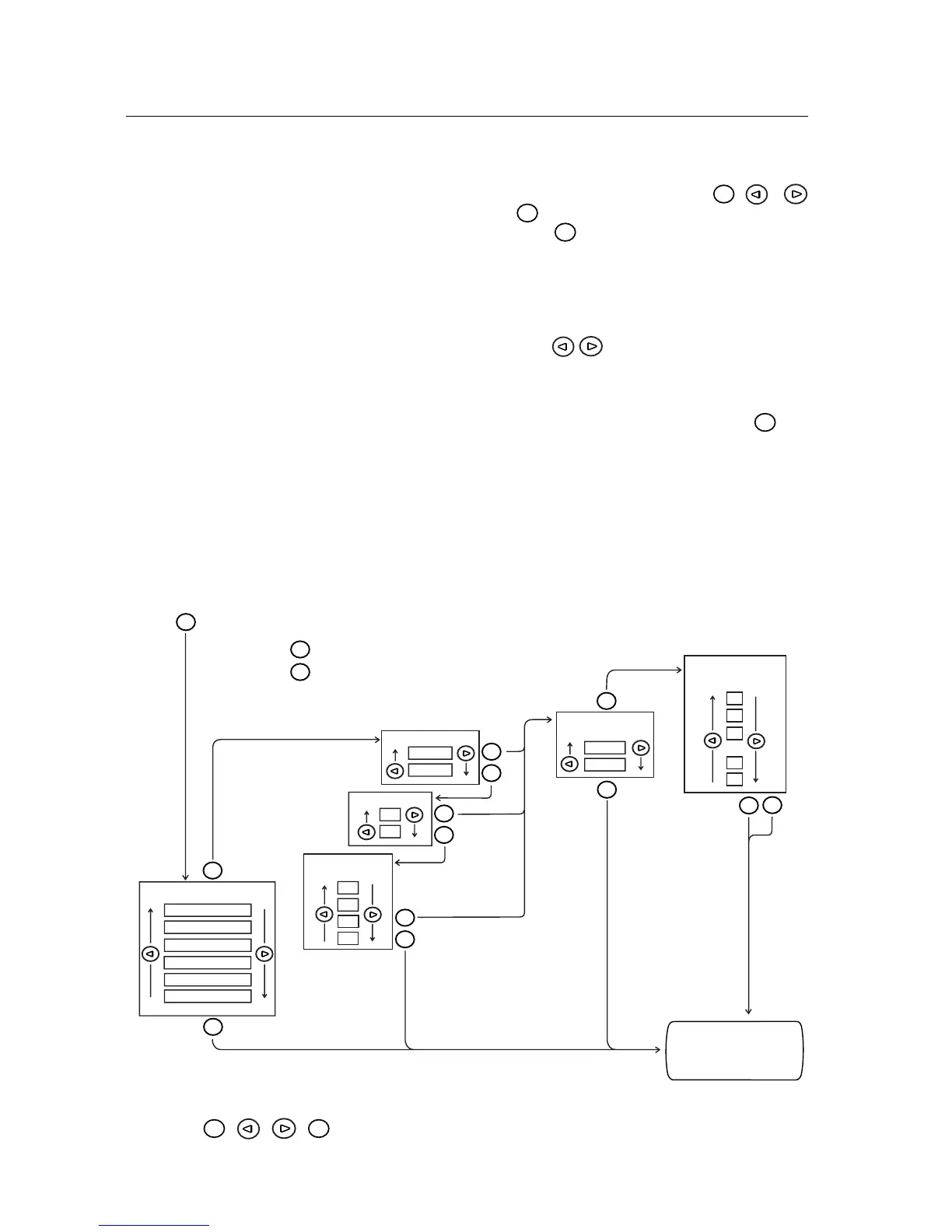
The diagram below shows all the parts of the pro-
gram you can alter. There follows a step-by-step
set of instructions guiding your way to making
programs that you prefer.
Each step begins with a description of the pro-
gram, option or setting that you can choose.This
is followed by a numbered sequence of instruc-
tions telling you what to do to obtain the chan-
ges you want.
The buttons that you will need to use for ma-
king your own programs are the
Menu
, ,
and
Enter
buttons.
With the
Menu
button you step forward through
the menu to reach the menu heading where you
wish to make an alteration. The menu headings
are: Program, Options, Temperature and Delayed
starting. The options consist of the sub-headings
Cooling, Signal and Anti-crease.
With the
buttons you can step forwards
or backwards in the respective headings to get
the setting you want.
When you have reached the setting you want,
you confirm your choice by pressing the
Enter
but-
ton once.
USE THE
Menu
, , ,
Enter
BUTTONS FOR MAKING YOUR OWN DRYING PROGRAMS
Menu
Menu
Enter
Menu
Enter
Menu
Enter
Menu
Enter
Enter
Enter
Menu
Extra dry
Dry
Normal dry
Iron dry
Timed dry program
Air fluff program
COOLING
Normal
Quick
BUZZER
Menu
0
1
2
11
12
.
.
.
Menu
Enter
ANTI-CREASE
PROGRAM (h)
0
1
3
2
Normal
Low
Begin by
pressing
Use the -button to acknowledge and save your choice.
Use the -button to go to the next menu heading without
making any changes in the program.
On
Off
SELECT PROGRAM
SELECT
TEMPERATURE
SELECT
DELAYED START (h)
The new settings
are now shown in
the display.
MAKING YOUR OWN DRYING PROGRAMS (T760/780)



 To Next Page