4
QUICK SET-UP
Thank you for purchasing the Yard Sentinel™! You have two options to get your device
started. Your unit came with an AC adapter. Remove the back cover from your device
and plug in the adapter. You will see an opening at the bottom of the unit that you can
run the cord through.
If you don’t have an electrical outlet available in the area, you will need four C batteries
(not included).
When you install power, a red light will turn on after a few moments. The light will stay on
for about 20 seconds and then switch o. Your device is now ready to use.
All of your controls are located at the back of your device. Remove the cover to adjust the
following settings as needed.
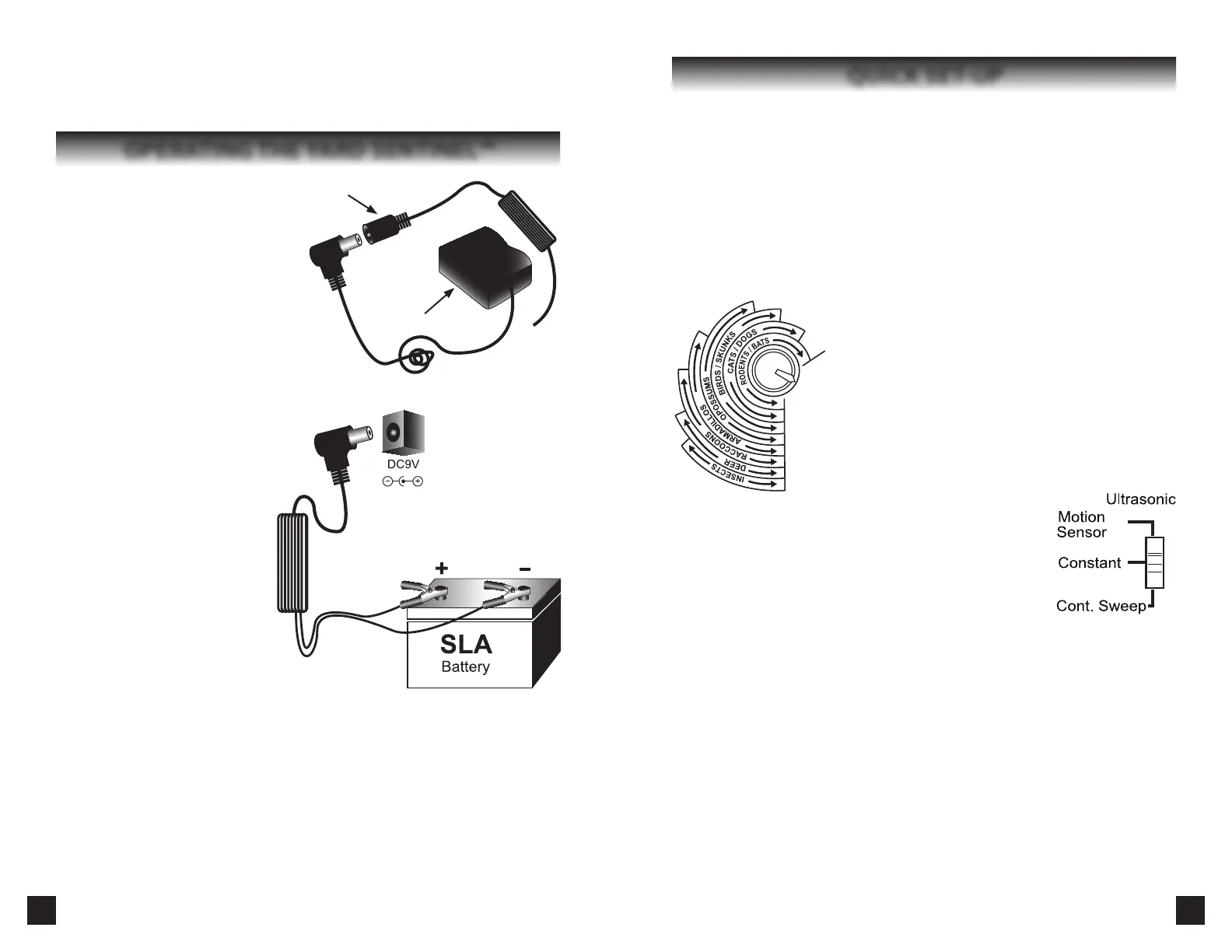
Frequency Dial: You will see several types of pests listed
around the Frequency dial (Fig. 1) and the ranges of
frequencies that are ideal for repelling them. You can turn
this dial to the setting that best suits your needs. If you are
trying to repel more than one type of pest, set it somewhere
within the ranges of each of them. Adjust the frequency
slightly every few weeks to avoid the pest adapting to the
sound.
Modes: The Yard Sentinel™ has three dierent modes(g.2).
Try all three to see what works best on the animal you are
trying to repel (see Operating the Yard Sentinel™, page 7).
Motion Sensor: The Motion Sensor will activate the ultrasonic and
sonic sounds when it detects pests within its range.
Constant: The Constant setting will activate the ultrasonic
and sonic noises at a set frequency. The motion detector will
deactivate on this setting.
Continuous Sweep: The Continuous Sweep will activate a range of
random sonic and ultrasonic frequencies. The motion detector
will be deactivated on this setting. This is helpful for repelling several dierent
types of pests.
Sensitivity Dial: The Sensitivity dial adjusts the distance at which the device’s motion
sensor will work.
Sonic Volume: The Sonic Volume adjusts the loudness of the alarm and harassment
sound. If this sound bothers you or your neighbours, turn it all the way down. The
ultrasonic signal will still be eective in repelling pests.
Guidelines to help you get the most out of the Yard Sentinel:
1.
With batteries, set the Ultrasonic switch to Motion Sensor. Doing so will considerably
prolong the battery life. Set the Motion Sensor Sensitivity to 20-25 for smaller
animals (squirrels, mice, birds) and 15-20 for larger animals (dogs, raccoons, deer).
2.
When plugged-in, use Constant, as it provides the best protection for repelling a
specic type of animal.
3.
If you need to repel several types of animals, set the switch to Continuous Sweep;
Fig. 1
7
OPERATING TIME:
Some pests, like birds, are active only in the daytime. Others, like raccoons, are active at
night. You can choose whether to operate your device only in the daytime, nighttime or
all day with the power-saving Operating Time feature (, Page 6, Fig. 6).
OPERATING THE YARD SENTINEL™
Using the A/C Adapter:
Remove the back cover of the unit by
gently pulling it off. Plug one end of
the A/C adapter into the 9 volt D/C jack
located beside the frequency dial. Plug
the other end into any standard A/C
outlet. Thread the A/C adapter cord
through the notch at the bottom of the
unit and then replace the back cover by
snapping it into place (see page 11). If you
do not have a weather-proof electrical
outlet, the adapter should be plugged in
indoors. The device and the 9-volt port are weather resistant, but it is best to protect
the Yard Sentinel™ from heavy rains
or snow.
Connecting the extension cord:
To connect the extension cord, simply
plug in the small side of the extension
cord at the back of the unit where it
indicates D/C 9V, then attach the
other larger plug to the A/C adapter
(Fig. 7).
Installing the batteries:
The Yard Sentinel™ can also operate
on batteries. It uses four size C
batteries. To install the batteries,
remove the back panel by gently
pulling it o. Install the batteries as
shown on the diagram (see page 11)
so the positive and negative poles
match the poles printed on the unit. With the batteries in place, replace the back cover
of the unit by pressing it until it snaps closed.
Intelligent Power System (IPS):
The Yard Sentinel™ is designed to provide uninterrupted protection even during a power
failure. Install four C batteries and plug in your device. Your device will be powered through
electricity. If the power fails, the device will automatically switch to battery backup.
Available Power Source Accessories:
Some of our customers choose to use their device in remote areas without traditional
power outlets. The Yard Sentinel™ can be connected to a 12V D/C Sealed Lead-Acid (SLA)
battery using our special extension cord with alligator clip and D/C power plug (Fig. 8).
Fig. 7
Extension Cord
A/C Adapter
Insert plug in 9 volt
D/C jack located at
back of the unit.
Attached alligator clips to
SLA battery slugs
Fig. 8
Fig. 2


 To Next Page
 Loading...