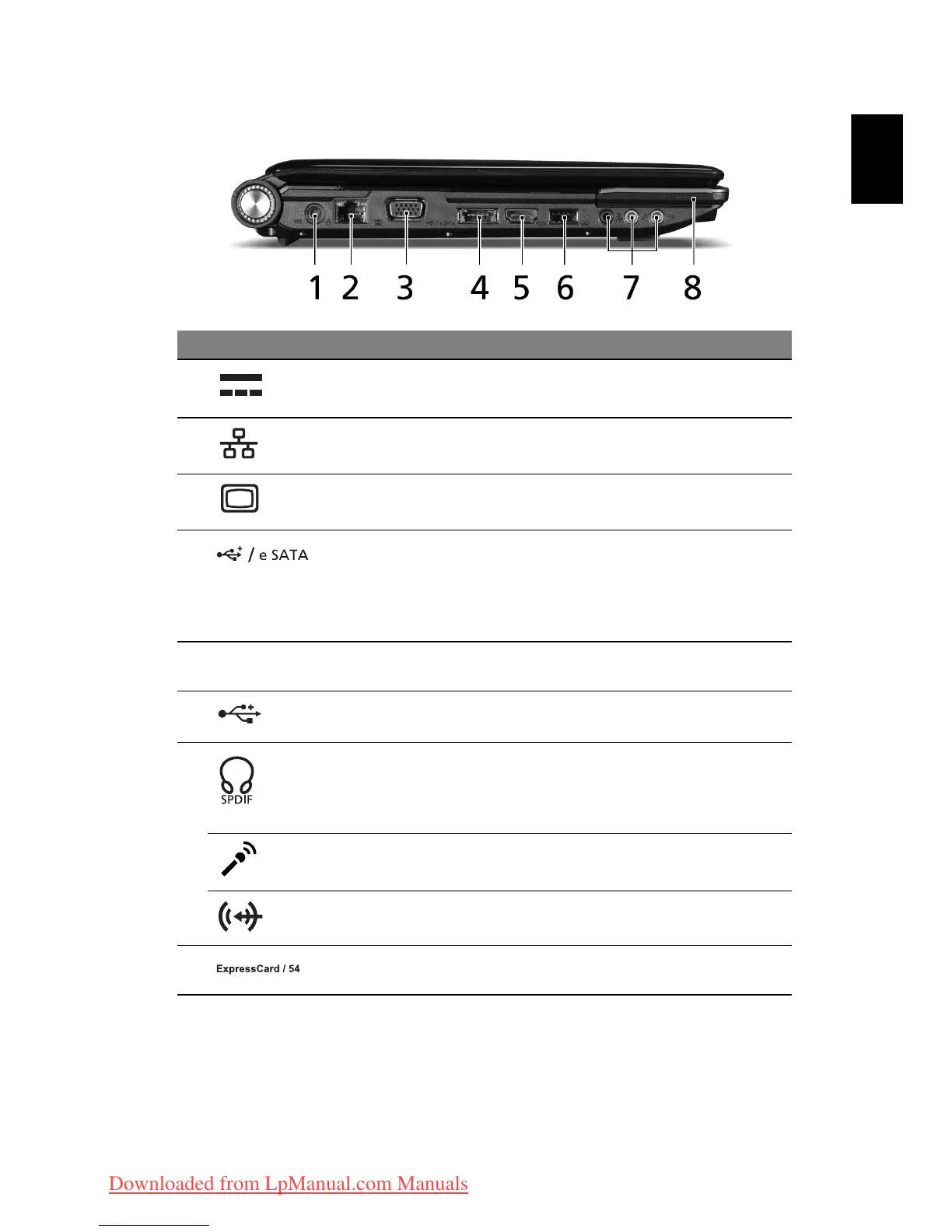
Left view
# Icon Item Description
1 DC-in jack Connects to an AC adapter.
2 Ethernet (RJ-45)
port
Connects to an Ethernet 10/100/1000-
based network.
3 External display
(VGA) port
Connects to a display device (e.g.,
external monitor, LCD projector).
4 USB 2.0 / eSATA
port
Connects to USB 2.0 or eSATA devices
(only for certain models).
Note:
If you plug an eSATA device you
will have two USB ports available in the
mean time
.
5 HDMI HDMI port Supports high definition digital video
connections (only for certain models).
6 USB 2.0 port Connects to USB 2.0 devices (e.g., USB
mouse, USB camera).
7 Headphones/
speaker/line-out
jack with
S/PDIF support
Connects to audio line-out devices
(e.g., speakers, headphones).
Microphone jack
Accepts inputs from external
microphones.
Line-in jack Accepts audio line-in devices (e.g., audio
CD player, stereo walkman, mp3 player)
8 ExpressCard/54
slot
Accepts one ExpressCard/54 module.
Downloaded from LpManual.com Manuals



 To Next Page