53
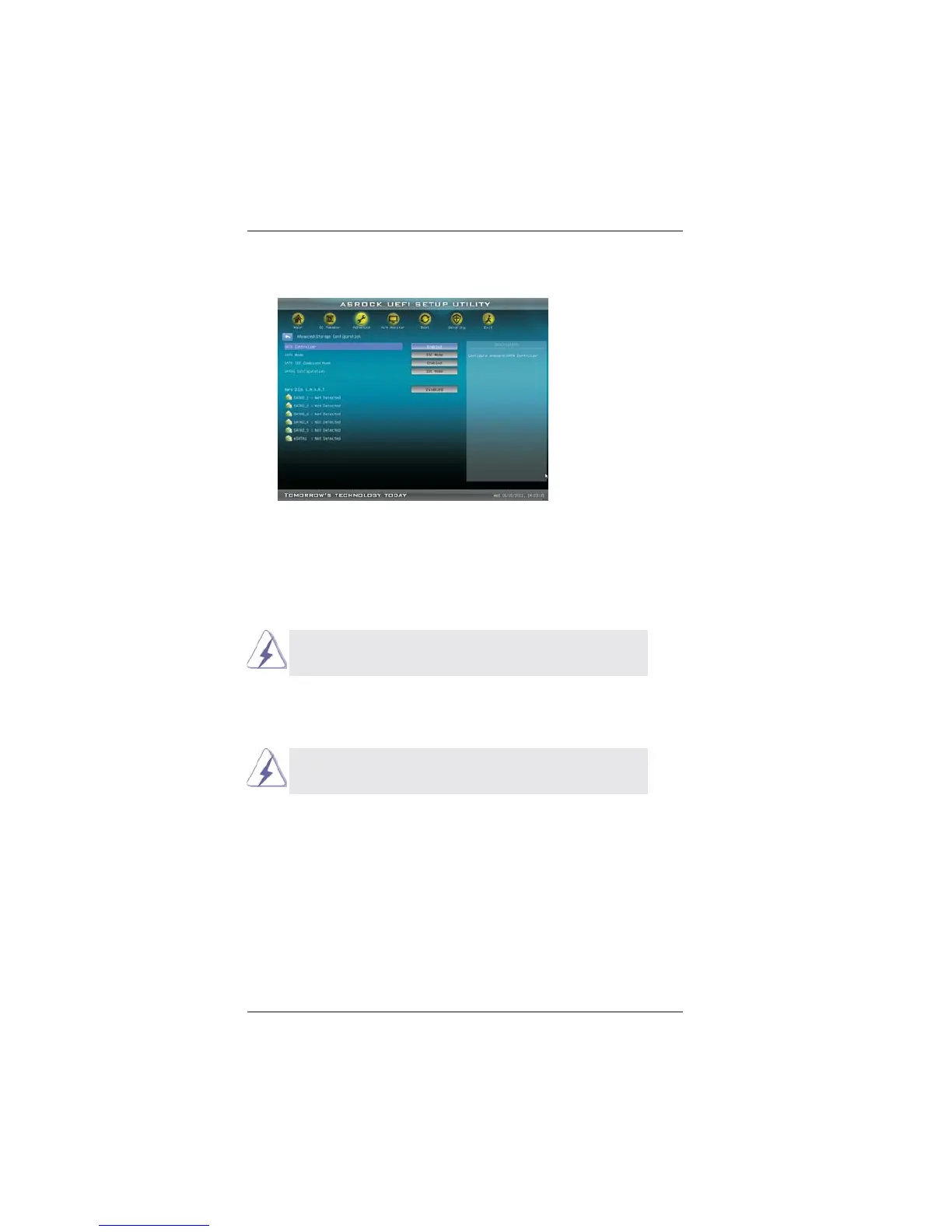
3.4.4 Storage Configuration
SATA Controller
Use this item to enable or disable the “SATA Controller” feature.
SATA Mode
This item is for SATA2_1 to SATA2_5 ports. Use this item to adjust SATA
Mode. The default value of this option is [IDE Mode]. Con guration op-
tions: [AHCI Mode], [RAID Mode] and [IDE Mode].
If you set this item to RAID mode, it is suggested to install
SATA ODD driver on SATA2_5 and eSATA2 ports.
SATA IDE Combined Mode
This item is for SATA2_5 and eSATA2 ports. Use this item to enable or dis-
able SATA IDE combined mode. The default value is [Enabled].
If you want to build RAID on SATA2_5 and eSATA2 ports, please
disable this item.
SATA3 Confi guration
This item is for SATA3_1 and SATA3_2 ports. Use this item to adjust
SATA3 con guration. The default value of this option is [IDE Mode]. Con-
guration options: [Disabled], [AHCI Mode] and [IDE Mode].
Hard Disk S.M.A.R.T.
Use this item to enable or disable the S.M.A.R.T. (Self-Monitoring, Analy-
sis, and Reporting Technology) feature. Con guration options: [Disabled],
[Auto], [Enabled].









 To Next Page