
 Need help?
Do you have a question about the ASROCK B650 PRO RS and is the answer not in the manual?
Lists the items included in the motherboard package, such as the motherboard itself, manual, and cables.
Provides detailed technical specifications of the motherboard, including CPU, chipset, memory, and graphics capabilities.
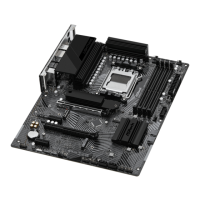
Illustrates the physical layout of the motherboard, identifying key components and connectors with numbered labels.
Details the external connectivity ports on the rear of the motherboard, including USB, LAN, HDMI, and audio jacks.
Presents a system block diagram illustrating the interconnections between the CPU, chipset, and various onboard controllers and interfaces.
Outlines essential safety precautions and handling guidelines to prevent damage to the motherboard and components during installation.
Provides detailed instructions and visual aids for correctly installing the CPU into the motherboard socket.
Explains the process of installing the CPU cooler and heatsink, including thermal grease application for optimal heat dissipation.
Guides users on how to properly install DDR5 memory modules (DIMMs) into the motherboard's slots for optimal performance.
Details how to connect the motherboard's front panel headers for power buttons, LEDs, and reset switches from the computer case.
Illustrates the procedure for physically mounting the motherboard inside the computer chassis using screws.
Provides instructions on how to connect SATA drives, including optical drives and SSDs/HDDs, using data and power cables.
Demonstrates the process of inserting a graphics card into the appropriate PCIe slot on the motherboard.
Explains the different types of PCIe slots available on the motherboard and their intended uses for expansion cards.
Illustrates how to connect common external peripherals like monitors, keyboards, mice, and speakers to the PC.
Details the correct method for connecting the main ATX power and CPU power connectors from the power supply unit to the motherboard.
Outlines the sequence of actions required to safely power on the newly assembled computer system.
Describes the function and configuration of motherboard jumpers, specifically the Clear CMOS jumper for resetting BIOS settings.
Covers the various internal headers and connectors on the motherboard, such as USB, audio, fan, and LED headers.
Explains the functionality of the BIOS Flashback button, allowing BIOS updates without needing a CPU or RAM.
Describes the Post Status Checker (PSC) LEDs, which indicate the status of CPU, DRAM, VGA, and storage during boot.
Provides step-by-step instructions for installing an M.2 SSD module into the M2_1 slot, including heatsink mounting.
Details the procedure for installing an M.2 SSD module into the M2_2 socket, covering different module types and lengths.
Offers instructions for installing an M.2 SSD module into the M2_3 socket, focusing on module compatibility and proper installation.
 General
| Processor socket | Socket AM5 |
|---|---|
| Processor manufacturer | AMD |
| Compatible processor series | AMD Ryzen 7, AMD Ryzen 9 7th Gen, AMD Ryzen 5 |
| Maximum number of SMP processors | 1 |
| Non-ECC | Yes |
| Memory channels | Dual-channel |
| Memory slots type | DIMM |
| Number of memory slots | 4 |
| Supported memory types | DDR5-SDRAM |
| Maximum internal memory | 128 GB |
| RAID levels | 0, 1, 10 |
| Supported storage drive types | HDD & SSD |
| Supported storage drive interfaces | M.2, SATA III |
| Parallel processing technology support | - |
| USB 2.0 connectors | 2 |
| DisplayPort version | 1.4 |
| USB 2.0 ports quantity | 6 |
| USB 3.2 Gen 1 (3.1 Gen 1) Type-C ports quantity | 0 |
| Wi-Fi | No |
| LAN controller | Dragon RTL8125BG |
| Ethernet interface type | 2.5 Gigabit Ethernet |
| Audio chip | Realtek ALC897 |
| Component for | PC |
| Motherboard chipset | AMD B650 |
| Audio output channels | 7.1 channels |
| Motherboard form factor | ATX |
| Windows operating systems supported | Windows 10 Pro x64, Windows 11 x64 |
| BIOS type | UEFI AMI |
| BIOS memory size | 256 Mbit |
 Weight and Dimensions
| Depth | 244 mm |
|---|---|
| Width | 305 mm |



 To Next Page