EasyManua.ls Logo

Assa Abloy Securitron EEB2 - User Manual

Assa Abloy Securitron EEB2
4 pages
Print Icon
To Next Page IconTo Next Page
Loading...
1 of 4
Securitron
®
EEB2, EEB3N
Exit Button with Integrated Timer
Installation & Operating Instructions
Description
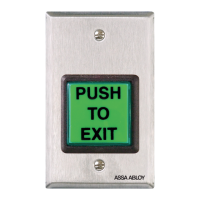
Model Securitron EEB2 is a two-inch square, exit button,
mounted on a stainless steel, single gang key plate.
Model Securitron EEB3N is a rectangular exit button,
mounted on a 1 3/4" stainless steel narrow stile key plate.
Both Securitron EEB2 and EEB3N have a 3A switching
capacity and a timer set for 30 seconds. These units are
intended only for release of a magnetic lock from the inside
of a door. When the button is pressed, the lock releases
for 30 seconds. If pressed again during the 30-second
lock release period, the unit will “retrigger” starting a
new 30-second lock release period. These buttons are
specifically intended for installation on access controlled
egress doors, as described in the International Building Code
(IBC). Check your jurisdiction for applicable IBC codes.
A motion detector, such as the Securitron Model XMS,
is the primary means of magnetic lock release on the
door. The Securitron EEB2 or EEB3N exit button is
employed as a backup means of releasing the lock in
case of a problem with the motion detector. It should
be noted that the exact release time will vary with
temperature, but it will not be less than 30 seconds.
UL294 Access Control
Performance Levels
The following are the UL294 access
control performance levels:
Destructive Attack = Level 1
Line Security = Level 1
Endurance = Level 1 (6,000 cycles)
Standby Power = Level 1
Securitron EEB2
Securitron EEB3N
Question and Answer IconNeed help?

Do you have a question about the Assa Abloy Securitron EEB2 and is the answer not in the manual?

Summary

Product Description and Specifications

Model Securitron EEB2 and EEB3 N

Description of the Securitron EEB2 and EEB3N exit buttons, including size and mounting.

UL294 Access Control Performance Levels

Details the Securitron EEB2 and EEB3N's UL294 performance levels for access control.

Installation Procedures

Mounting Instructions

Guidance on mounting the Securitron EEB2 and EEB3N units on door frames.

Wiring Guide

Instructions and diagrams for wiring the Securitron EEB2 and EEB3N exit buttons.

Maintenance and Customization

Changing Alternate Lens on EEB2

Step-by-step instructions for changing the alternate lens on the Securitron EEB2.

Changing Alternate Lens on EEB3 N

Step-by-step instructions for changing the alternate lens on the Securitron EEB3N.

Warranty Information

Overview

The Securitron EEB2 and EEB3N are exit buttons with integrated timers designed for access-controlled egress doors. These devices are primarily intended for the release of magnetic locks from the inside of a door, serving as a backup to a primary motion detector such as the Securitron Model XMS.

Function Description:

When the button is pressed, the magnetic lock releases for a factory-set period of 30 seconds. If the button is pressed again during this 30-second release period, the unit "retriggers," starting a new 30-second lock release period. The exact release time may vary slightly with temperature but is guaranteed not to be less than 30 seconds. These buttons are specifically designed for installation on egress doors in compliance with the International Building Code (IBC). Users should consult their local jurisdiction for applicable IBC codes.

Important Technical Specifications:

  • Switching Capacity: Both models feature a 3A switching capacity.
  • Timer: Integrated 30-second timer for lock release.
  • Voltage: Operates on either 12 VDC or 24 VDC. The units are factory-shipped with a jumper in place for 12 VDC operation. Removing the jumper configures the unit for 24 VDC. They can accept full-wave rectified DC (from a transformer and bridge rectifier).
  • Current Draw: When at rest, the units draw no current. When releasing the lock, they draw 28 mA at 12 VDC or 38 mA at 24 VDC.
  • UL294 Access Control Performance Levels:
    • Destructive Attack: Level 1
    • Line Security: Level 1
    • Endurance: Level 1 (6,000 cycles)
    • Standby Power: Level 1
  • Wiring:
    • Red wire: +12 V or +24 V
    • Black wire: 0 V (DC Neg)
    • Green wire: Connects to the LOCK "+" Wire
    • White wire: Connects to +V (positive input voltage from the same power source as the red and black wires)
  • Internal Schematic Components: Includes a Push Button (with C, NC, NO contacts) and a Timer (with NC, C, Trigger, + contacts).

Usage Features:

  • Securitron EEB2: A two-inch square exit button mounted on a stainless steel, single-gang key plate.
  • Securitron EEB3N: A rectangular exit button mounted on a 1 3/4" stainless steel narrow stile key plate.
  • Mounting:
    • EEB2: Mounts using its included mounting device.
    • EEB3N: Mounts directly on a narrow stile aluminum door frame. Note that the aluminum door frame must be sufficiently routed to accommodate the EEB3N components.
  • Safety Precaution: Users are cautioned that the Securitron EEB2 and EEB3N can be damaged if operated on 24 VDC with the jumper in place, or if operated on a power supply different from the one operating the magnetic lock. The positive input voltage on the white wire must originate from the same power source connected to the red and black wires.

Maintenance Features (Changing the Alternate Lens):

For Securitron EEB2:

  1. Grasp and turn over the keyplate.
  2. From the back, rotate the white contact block of the switch counterclockwise to the 11:00 o'clock position, and pull straight back to remove it.
  3. Slide a slender, smooth-ended object (e.g., a marker pen) inside the switch body up against the lens.
  4. Place the object on a smooth surface with the keyplate on top, and tap the keyplate up and down on the object to pop off the lens.
  5. Remove the old lens and insert the new one.
  6. Turn over the keyplate and place the new insert onto the front of the switch.
  7. Ensure the text on the insert is correctly oriented and place the matching color lens on top of the insert.
  8. Press around all edges of the lens until it snaps into place.
  9. Depress the lens several times to ensure smooth operation and confirm it is not binding.
  10. With the terminals upward, insert the contact block back into the switch at the 11:00 o'clock position and rotate clockwise until it stops straight up and down.

For Securitron EEB3N:

  1. While holding the keyplate, grasp the top and bottom of the lens and pull it straight out from the keyplate.
  2. Place a new lens over the switch face, ensuring the text on the lens is correctly oriented.
  3. Press the lens completely until it snaps into place.
  4. Depress the lens several times to ensure smooth operation and confirm it is not binding.

Warranty:

For information on warranty coverage and replacement options, visit assaabloyesh.com/warranty.

Assa Abloy Securitron EEB2 Specifications

General IconGeneral
BrandAssa Abloy
ModelSecuritron EEB2
CategorySafety Equipment
LanguageEnglish

Related product manuals