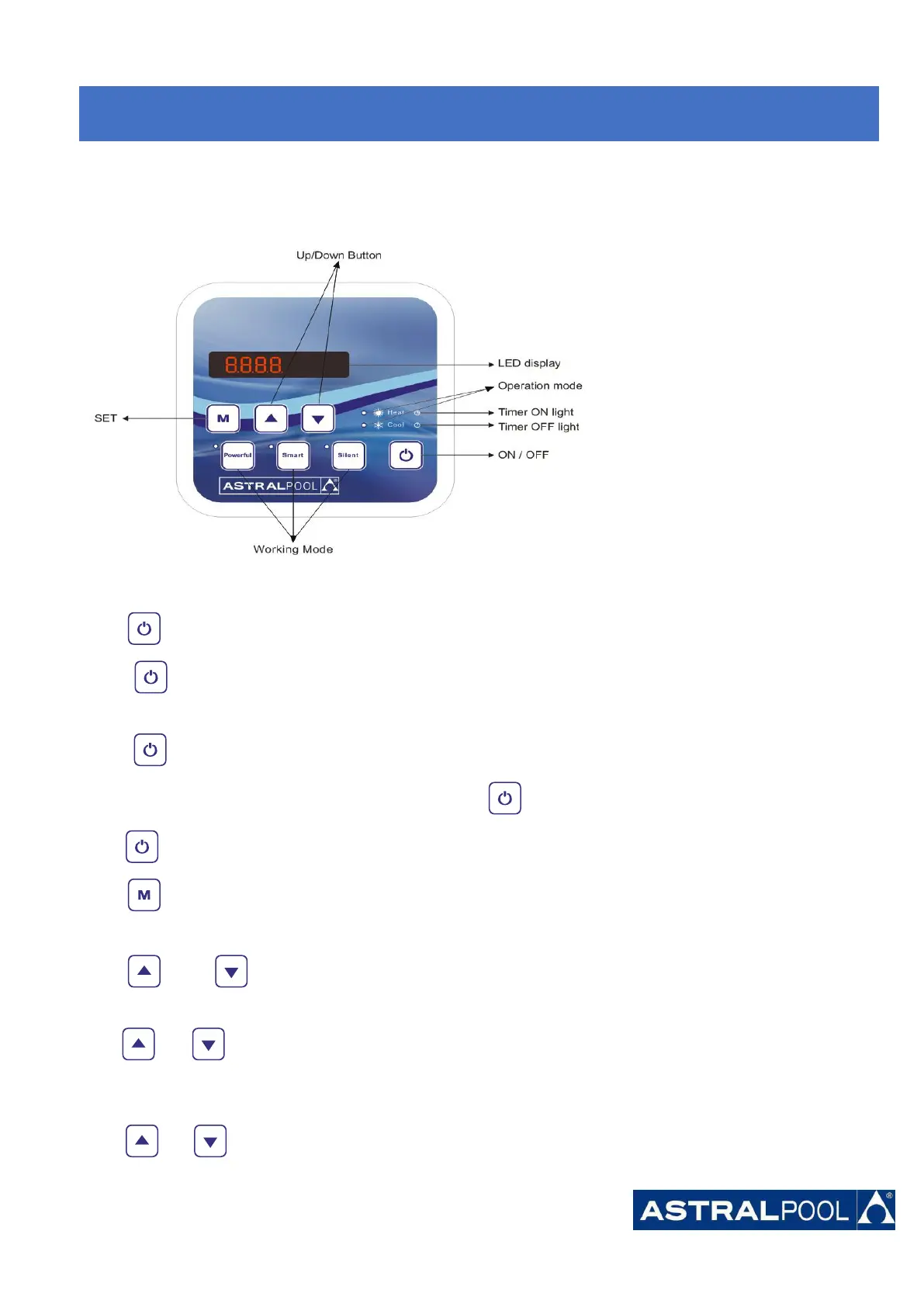
7. Display Controller Operation
7.1. Guide for operation
7.2 The keys and their operations
7.2.1 button
Press to start the heat pump unit, the LED display shows the desired water temperature for 5 seconds, then
shows the inlet water temperature and the operation mode.
Press to stop the heat pump unit and show “OFF”
Notice : During the parameter checking and setting, press the to quick-exit and save the current setting .
Press again to turn on/off the machine.
7.2.2 button
It will be under function only with another button.
7.2.3 and button
Clock/unclock the display:
Hold and for 5 seconds to lock/Unlock the display.
Water temperature setting:
Press or to set the water temperature directly.
7.
7.
7.
Start-up
Start-up
Start-up
of
of
of
the
the
the
Heat
Heat
Heat
Pump
Pump
Pump




 To Next Page