www.Astria.US.com
126854-01A 19
INSTALLATION
Continued
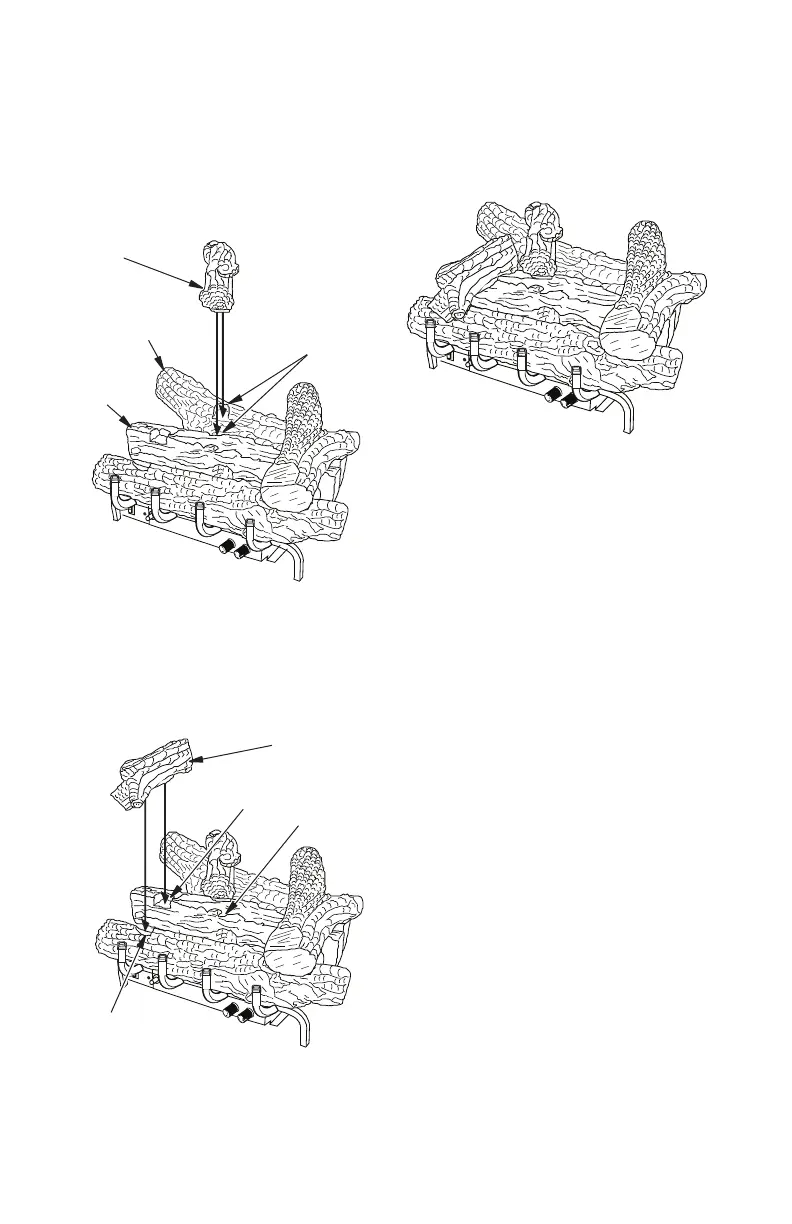
Figure 28 - Installing Middle Log
Figure 29 - Installing Top Left Log
Figure 30 - Final assembly
5. Place the top middle log onto the rear
& middle logs as shown in Figure 28.
Make sure to match up the shape on
the bottom of the top middle log with
the notches in the rear and middle logs.
6. Place the top left log onto the middle and
front logs as shown in Figure 29. Make
sure to match up the shape on the bot-
tom of the top left log with the notches
in the middle and front logs.
7. Final assembly is shown in Figure 30.
Top Middle
Log
Log
Notch
Log Notch
Front Log
Notch
Middle
Log
Rear Log
Top Left Log
Middle Log



 To Next Page