www.Astria.US.com
126854-01A22
CLEANING AND MAINTENANCE
WARNING: Turn off heater
and let cool before cleaning.
CAUTION: You must keep
control areas, burners and
circulating air passageways of
heater clean. Inspect these areas
of heater before each use. Have
heater inspected yearly by a quali-
ed service person. Heater may
need more frequent cleaning due
to excessive lint from carpeting,
pet hair, bedding material, etc.
WARNING: Failure to keep
the primary air opening(s) of
the burner(s) clean may result
in sooting and property damage.
Check pilot ame pattern and burner ame
patterns often.
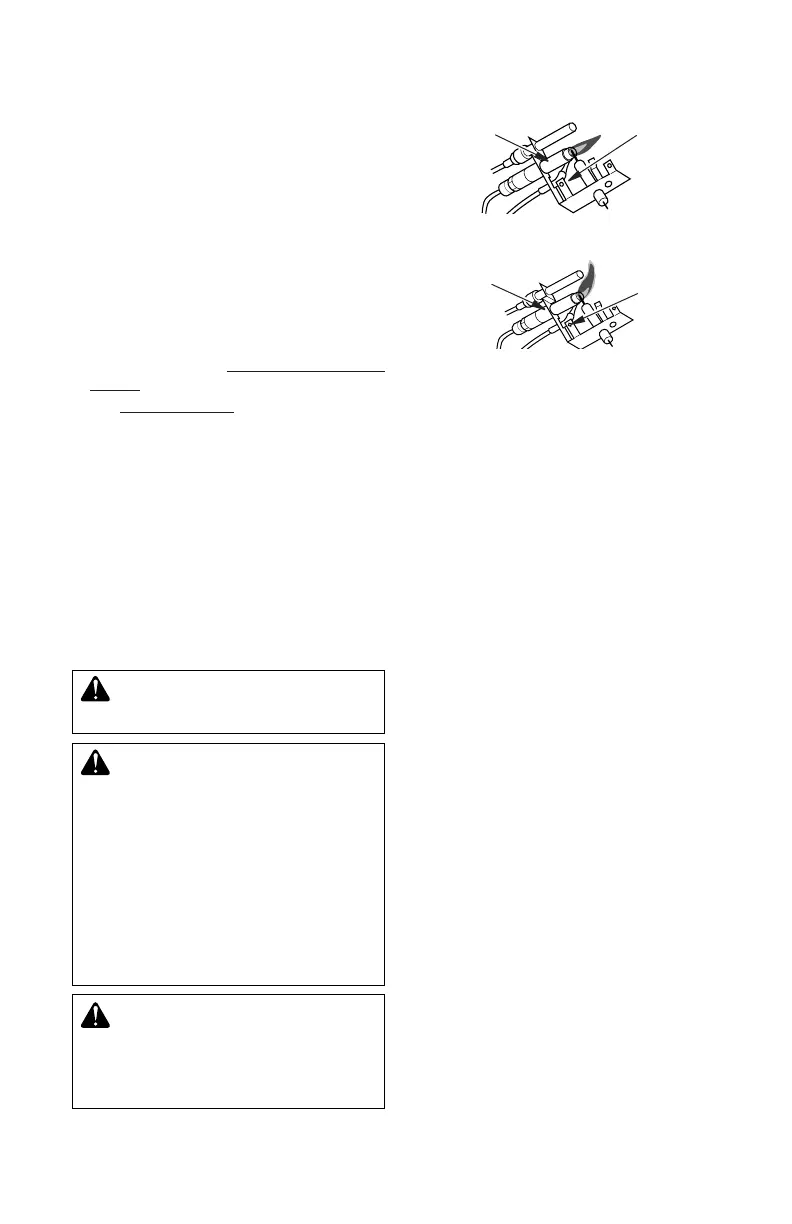
PILOT FLAME PATTERN
Figure 34 shows a correct pilot ame pattern.
Figure 35 shows an incorrect pilot ame pat-
tern. The incorrect pilot ame is not touching
the thermocouple. This will cause the thermo-
couple to cool. When the thermocouple cools,
the heater will shut down.
If pilot ame pattern is incorrect, as shown
in Figure 35
• turn heater off (see To Turn Off Gas to Ap-
pliance, page 21)
• see Troubleshooting, page 24
Note: The pilot ame on natural gas units will
have a slight curve, but ame should be blue
and have no yellow or orange color.
BURNER PRIMARY AIR HOLES
Air is drawn into the burner through the holes
in the tting at the burner entrance. These
holes may become blocked with dust or lint.
Periodically inspect these holes for any block-
age and clean if needed. Blocked air holes
will create soot.
INSPECTING BURNERS
Figure 34 - Correct Pilot Flame Pattern
(Your pilot may vary from pilot shown)
Pilot Burner
Thermocouple
Pilot Burner
Thermocouple
Figure 35 - Incorrect Pilot Flame Pattern
(Your pilot may vary from pilots shown)
MAIN BURNER
Periodically inspect all burner ame holes with
the heater running. All slotted burner ame
holes should be open with yellow ame pres-
ent. All round burner ame holes should be
open with a small blue ame present. Some
burner ame holes may become blocked by
debris or rust, with no ame present. If so,
turn off heater and let cool. Remove blockage.
Blocked burner ame holes will create soot.
BURNER ORIFICE HOLDER AND
PILOT AIR INLET HOLE
The primary air inlet holes allow the proper
amount of air to mix with the gas. This provides
a clean burning ame. Keep these holes clear
of dust, dirt, lint and pet hair. Clean these air in-
let holes prior to each heating season. Blocked
air holes will create soot. We recommend that
you clean the unit every three months during
operation and have heater inspected yearly by
a qualied service person.
We also recommend that you keep the burner
tube and pilot assembly clean and free of dust
and dirt. To clean these parts we recommend
using compressed air no greater than 30 PSI.
Your local computer store, hardware store or
home center may carry compressed air in a
can. If using compressed air in a can, please
follow the directions on the can. If you don’t
follow directions on the can, you could dam-
age the pilot assembly.



 To Next Page