www.Astria.US.com
126854-01A 23
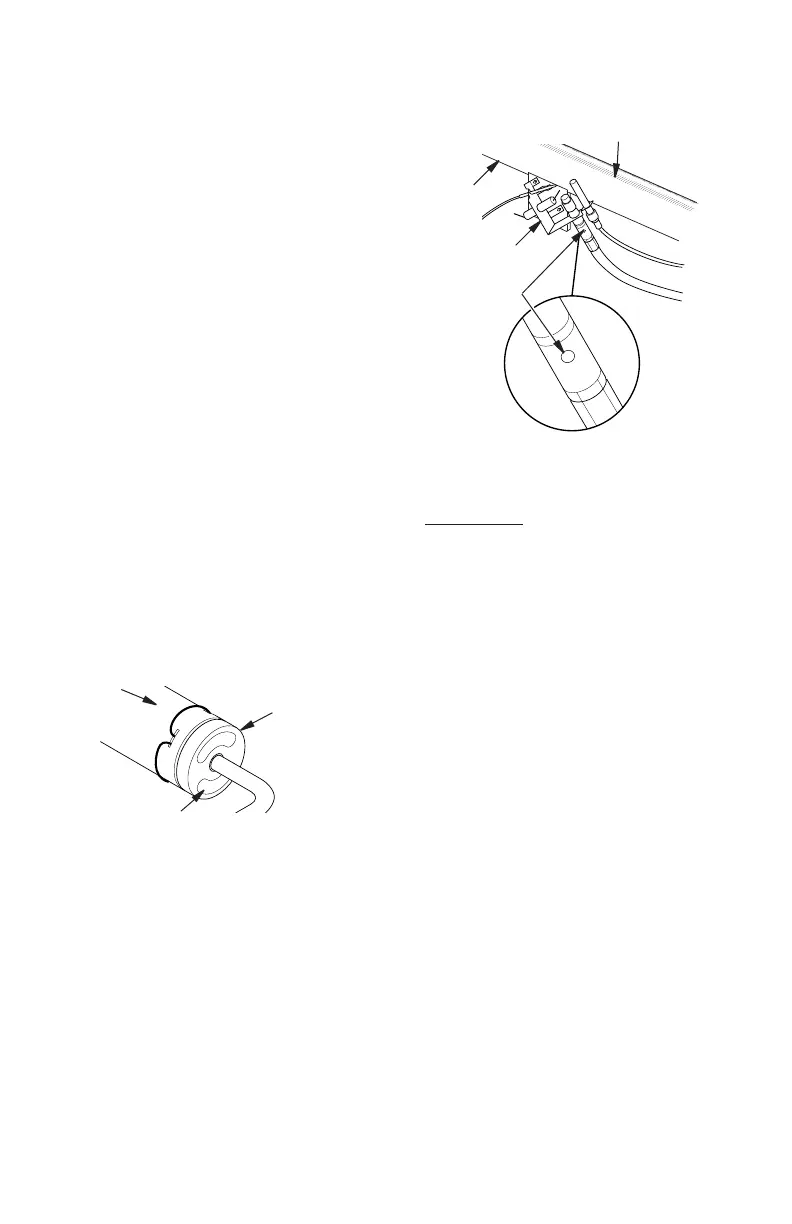
Burner Tube
Pilot Assembly
Pilot Air
Inlet Hole
Ports/Slots
Burner
Tube
Orice Holder
(May Be Brass
or Aluminum
Depending on
Model)
Primary Air Inlet Holes
(Shape of Holes May
Vary by Model)
Figure 36 - Orice Holder On Outlet
Burner Tube
Figure 37 - Pilot Inlet Air Hole
1. Shut off the unit, including the pilot. Allow
the unit to cool for at least thirty minutes.
2. Inspect burner, pilot and primary air inlet
holes on Orice holder for dust and dirt
(see Figures 36 and 37).
3. Blow air through the ports/slots and holes
in the burner.
4. Check the Orice holder located at the
end of the burner tube again. Remove
any large particles of dust, dirt, lint or pet
hair with a soft cloth or vacuum cleaner
nozzle.
5. Blow air into the primary air holes on the
Orice holder.
6. In case any large clumps of dust have now
been pushed into the burner repeat steps
3 and 4.
Clean the pilot assembly also. A yellow tip
on the pilot ame indicates dust and dirt in
the pilot assembly. There is a small pilot air
inlet hole about two inches from where the
pilot ame comes out of the pilot assembly
(see Figure 37). With the unit off, lightly blow
air through the air inlet hole. You may blow
through a drinking straw if compressed air is
not available.
CLEANING AND MAINTENANCE
Continued
LOGS
• If you remove logs for cleaning, refer to
Installing Logs, page 16, to properly replace
logs.
• Replace log(s) if broken or chipped (dime-
sized or larger).
MAIN BURNER
Periodically inspect all burner ame holes with
the heater running. All slotted burner ame
holes should be open with yellow ame pres-
ent. All round burner ame holes should be
open with a small blue ame present. Some
burner ame holes may become blocked by
debris or rust, with no ame present. If so,
turn off heater and let cool. Remove blockage.
Blocked burner ame holes will create soot.



 To Next Page