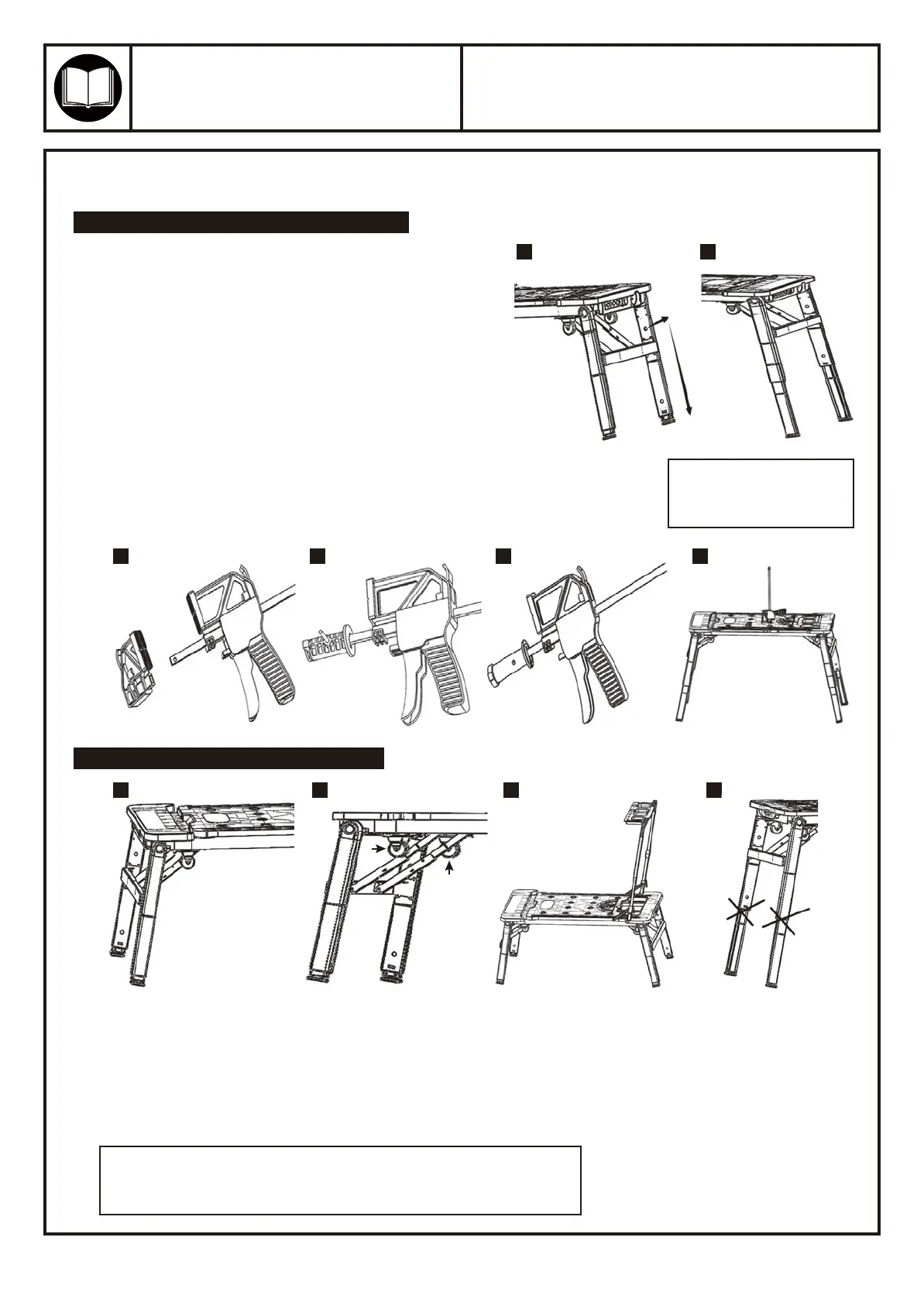
1. Firstly, set up the legs by following the same steps as
detailed within scaffold mode section.
2. Push the snap buttons on the side of each leg to release
them, then pull the inner legs out to the workbench
height. When legs are fully extended they will snap into
place. Gently turn the workbench upright onto a stable,
level surface.
3. Please follow below steps to connect with a quick clamp.
1. Release all legs from their locking position, then rotate each pair of legs until you can’t move them anymore.
2. Ensure the gusset brace is locked by pulling up it. Repeat for all the other gusset braces.
3. Pull the handle up until you can’t move it any more, then release the tool tray from it’s locking position, put
the tool tray on the top of the handle, forming a platform. THE LOADING CAPACITY FOR THE TOOL TRAY
IS 2KGS(4.5LBS) IN THIS MODE.
4. Hang the hook on the handle, it can be used to hang tool bags while working on the platform.
Product Type:Model:
55670
7-IN-1 WORKBENCH
Page 4
ASSEMBLY
WORKBENCH MODE & SAWHORSE MODE
SCAFFOLD MODE & PLATFORM MODE
1 2
1 2 3 4
3 4
5 6
SNAP
BUTTON
GUSSET
BRACES
a. Remove the small plastic part of your quick clamp (image 3).
b. Put the steel bar into our connector (image 4) and put a pin into
the lock hole, make sure they are connected firmly (image 5).
c. Put the connector into Sawhorse hole on the workbench surface and
rotate at least 30 degrees (image 6).
d. With the help of the 2 vice pegs on the workbench, a sawhorse is completed.
NOTE: DO NOT step on the
workbench while the legs
are fully extended.
WARNNING:
DON’T USE SCAFFOLD/PLATFORM MODE WITH LEGS FULLY EXTENDED.
The inner legs are not designed to be used in this function.



 To Next Page
 Loading...