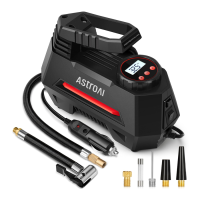
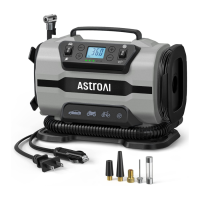
DIAGRAM
3
LED Light
Air Pressure Gauge
1
Carrying Handle
2
Inflation Tube
4
LED Light Switch
5
Inflation Switch
6
Power Cord
7
Long Cone Adapter
9
Needle Valve Adapter
10
Short Cone Adapter
11
Replacement Fuse
12
Valve Extender
13
12V Cigarette Lighter Plug
8
9
10 11 12
● During use, do not touch any parts of the air compressor apart from
the switch and handle. The air pump gets hot during use and stays
hot for some time after.
● Do not use chemical reagents to clean the air compressor. Only use
mild soap and a cloth dipped in hot water to clean the plastic parts.
1
2
3
4
5
6
7
8
13
Easy-Connect Schrader Valve Adapter
14
14


 To Next Page
 Loading...