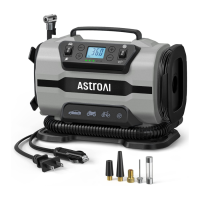
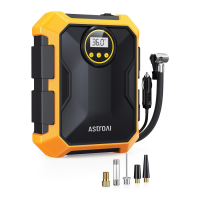
The AstroAI 100PSI Portable Air Compressor is a programmable air compressor pump designed for inflating various items, primarily tires for cars, small trucks, SUVs, motorcycles, and bicycles. Its core function is to inflate objects to a pre-set air pressure, after which it automatically shuts off, preventing over-inflation.
Function Description:
The air compressor operates by connecting to a 12V DC power source, typically a car's cigarette lighter outlet. It features a digital display that allows users to monitor air pressure during inflation and set the desired pressure value. The device supports four common pressure units: KPA, PSI, BAR, and KG/CM². Users can easily switch between these units using the "M" button and adjust the target pressure using the "+" and "-" buttons.
To use the compressor, the car engine should be running to ensure adequate power supply. The inflator pump is securely plugged into the car's 12V outlet. Once the desired pressure unit and value are set, the air nozzle is attached to the valve stem of the object to be inflated. For tires, the valve cap is removed, and the nozzle is placed directly onto the tire valve, then threaded to create a strong, secure seal. An improper angle when attaching the air chuck can lead to an inaccurate reading or an improper seal. The inflation process is initiated by pressing the inflation switch. The compressor will automatically stop once the pre-set pressure is reached. After inflation, the inflation switch is turned off, the power cord is disconnected, the valve connector is unscrewed, and the tire valve cap is replaced.
The device also includes an integrated LED flashlight, controlled by a separate light switch, which can be turned on or off as needed, providing illumination in low-light conditions.
Usage Features:
- Programmable Auto Shut-off: A key feature is its automatic shut-off capability. Users can pre-set a desired air pressure, and the compressor will automatically stop inflating once that pressure is reached, preventing over-inflation and ensuring safety.
- Digital Display: The LCD digital display provides clear and accurate pressure measurements, making it easy to read and understand the current and target pressure values.
- Multiple Pressure Units: The compressor supports KPA, PSI, BAR, and KG/CM², offering flexibility for users who may be accustomed to different measurement standards.
- User-Friendly Controls: The "M" button for unit selection and "+"/"-" buttons for pressure adjustment are intuitive, simplifying the operation process.
- Long Power Cord: Equipped with a 10ft (3m) power cord, the compressor can easily reach all tires of a car, enhancing convenience.
- Portable Design: The compact and lightweight design makes it easy to carry and store in a car, making it readily available for emergencies or regular maintenance.
- Versatile Adapters: The package includes various inflation adapters (long cone, needle valve, short cone, Schrader valve adapter, and valve extender), making it compatible with a wide range of inflatables beyond just tires, such as sports balls and other small inflatables.
- LED Light: The built-in LED flashlight is a practical addition, especially when inflating in dimly lit environments or at night.
Maintenance Features:
- Continuous Use Limitation: To ensure optimal performance and prevent overheating, the compressor has a recommended continuous use time of 15 minutes. After extended use, it is advised to let the pump rest for 10 minutes before using it again. This helps prolong the lifespan of the device.
- Overheating Protection: The compressor is designed with an overheating protection mechanism. If it runs continuously for more than 15 minutes, it will automatically shut off to prevent damage from excessive heat. Users should allow it to cool for 10 minutes before resuming operation.
- Fuse Replacement: The device includes a replacement fuse, indicating that fuses may need to be checked and replaced if the compressor fails to inflate. Users should ensure the in-line fuse is securely inserted and replace it if necessary. It's also important to check the vehicle's cigarette lighter fuse, ensuring it is rated at 10A or higher.
- Cleaning Instructions: For cleaning the plastic parts of the air compressor, only mild soap and a cloth dipped in hot water should be used. Chemical reagents are explicitly advised against, as they may damage the product.
- Storage Guidelines: The air compressor should not be stored in high-temperature or humid environments to prevent damage. When not in use, it should be disconnected from all power sources.
- Handling Precautions: Users are instructed to move the product by using its handle and not to drag it by pulling the power cord or the air hose, which could cause damage to these components.
- Connection Checks: Troubleshooting guidelines emphasize ensuring secure connections for the inflation nozzle to the tire's valve stem and the 12V socket to the power cord, as loose connections can lead to abnormal operation or air leakage.

 Need help?
 General

 To Next Page