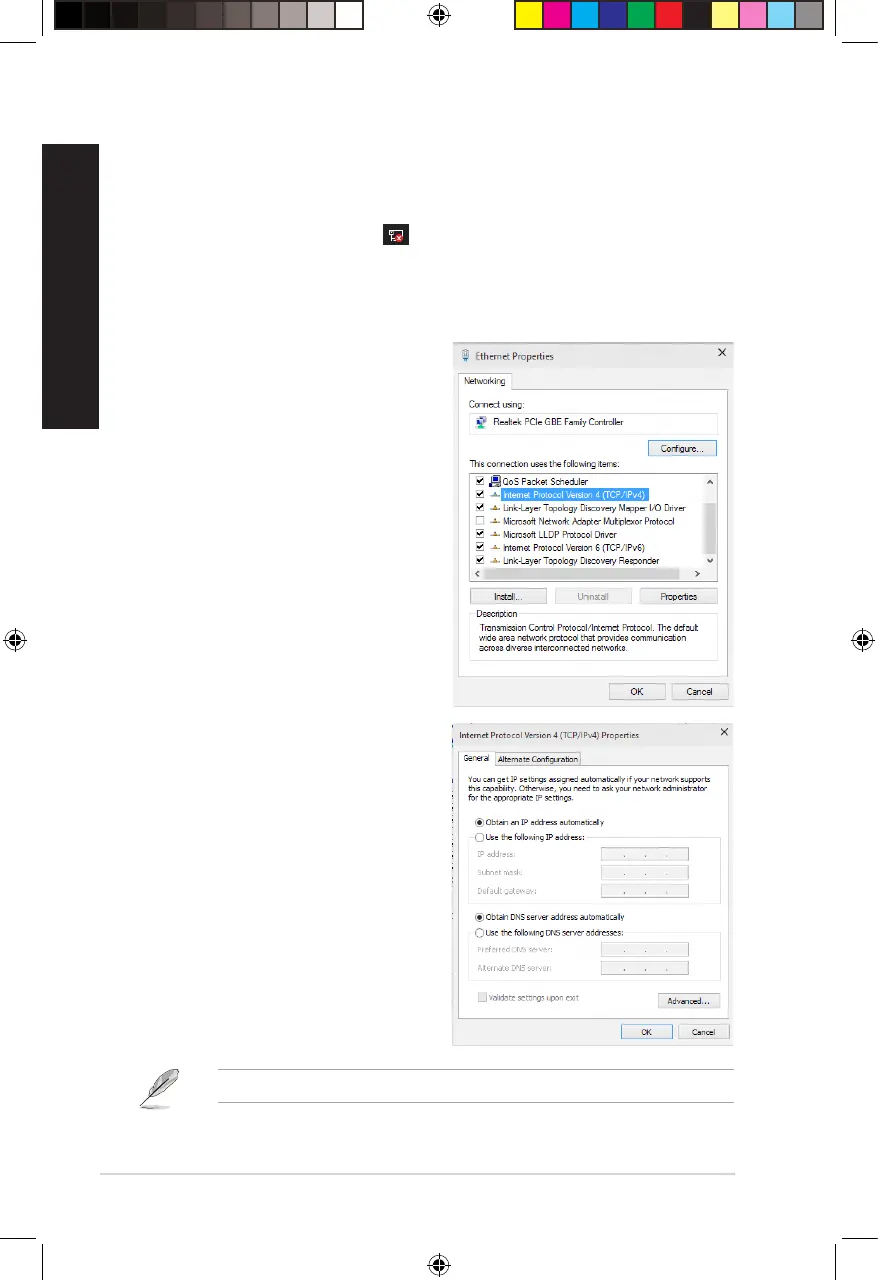
Conguring a dynamic IP/PPPoE network connection
To congure a dynamic IP/PPPoE network connection:
1. Launch Network and Sharing Center in either of these two ways:
a) From the taskbar, right-click , then click Open Network and Sharing Center.
b) From the Start menu, click Settings > Network & Internet > Ethernet > Network and
Sharing Center.
2. From the Open Network and Sharing Center screen, click Change Adapter settings.
3. Right-click on your LAN and select
Properties.
4. Click Internet Protocol Version 4(TCP/
IPv4) and click Properties.
5. Click Obtain an IP address automatically
and click OK.
Continue to the next steps if you are using PPPoE connection.
40
Chapter 4: Connecting to the Internet
ENGLISH
ENGLISH
E16757_D700SA_D500SA_Series_UM.indb 40E16757_D700SA_D500SA_Series_UM.indb 40 2020/6/9 10:31:112020/6/9 10:31:11



 To Next Page