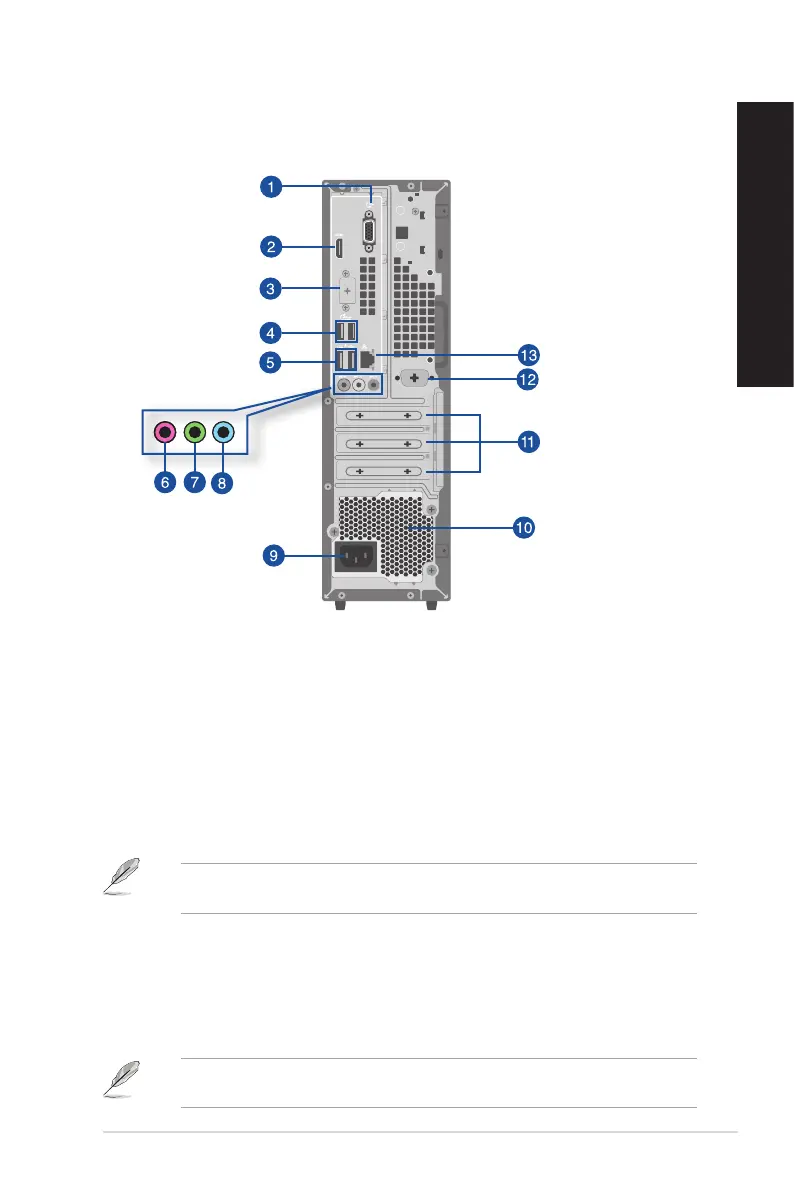
1. VGA port. This port is for VGA-compatible devices such as a VGA monitor.
2. HDMI™ port. This port is for a High-Denition Multimedia Interface (HDMI™) connector, and
is HDCP compliant allowing playback of HD DVD, Blu-ray, and other protected content.
3. Flex I/O port (optional). This is an HDMI 2.1 TMDS port, DP 1.4 port, or VGA port.
4. USB 3.2 Gen 1 ports. The Universal Serial Bus 3.2 Gen 1 (USB 3.2 Gen 1) ports connect to USB
3.2 Gen 1 devices such as a mouse, printer, scanner, camera, PDA, and others.
5. USB 2.0 ports. These Universal Serial Bus 2.0 (USB 2.0) ports connect to USB 2.0 devices such
as a mouse, printer, scanner, camera, PDA, and others.
When USB Wake is enabled in the BIOS, the system will turn on or wake from hibernation when a
USB mouse or keyboard connected to this port is used. (This option is disabled by default.)
6. Microphone port (pink). This port connects to a microphone.
7. Line Out port (lime). This port connects to a headphone or speaker. In a 4, 5.1, or
7.1-channel conguration, the function of this port becomes Front Speaker Out.
8. Line In port (light blue). This port connects to a tape, CD, DVD player, or other audio
sources.
Refer to the audio conguration table below for the function of the audio ports in the 2, 4, 5.1, or
7.1-channel conguration.
D501SER / D501SERES / D501SERC / M501SER / S501SER Rear panel
ASUS Desktop PC 25
ENGLISH
ENGLISH



 To Next Page