Chapter 2: Getting Started
2-6
Browsing web pages
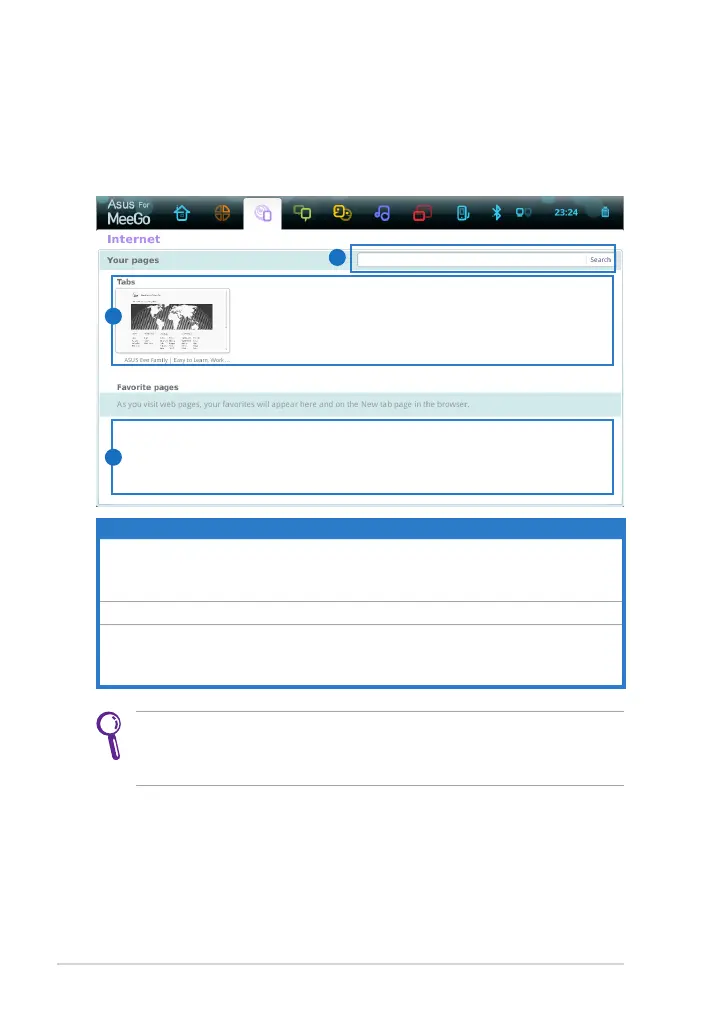
After you finish the network setup, click Internet from the toolbar and
start enjoying net surfing.
Visit our Eee PC homepage (http://eeepc.asus.com) to obtain the
latest information and register at http://vip.asus.com for full service
of your Eee PC.
Item Description
1
The internet web address bar provides a quick and useful start to
browsing the web. Enter any URL to visit the website, or enter any
keyword to search related information on the internet.
2
The Tabs area is a view of your last or currently running session.
3
Favorite pages are your favorite websites, which you clicked the star
to the right of the address bar to designate as favorites in the web
browser.
1
3
2



 To Next Page