Chapter 3: Using the Eee PC
3-6
Bluetooth Connection
(on selected models)
This device contains FCC ID: MSQ-X101NB037H / MSQ-X101NE785H
and IC ID: 3568A-X101NB037H / 3568A-X101NE785H
Bluetooth technology eliminates the need for cables for connecting
Bluetooth-enabled devices. Examples of Bluetooth-enabled devices may
be Notebook PCs, Desktop PCs, mobile phones, and PDAs.
To connect to a Bluetooth-enabled device:
1. Press <Fn> + <G> repeatedly until Bluetooth ON or WLAN &
Bluetooth ON is shown.
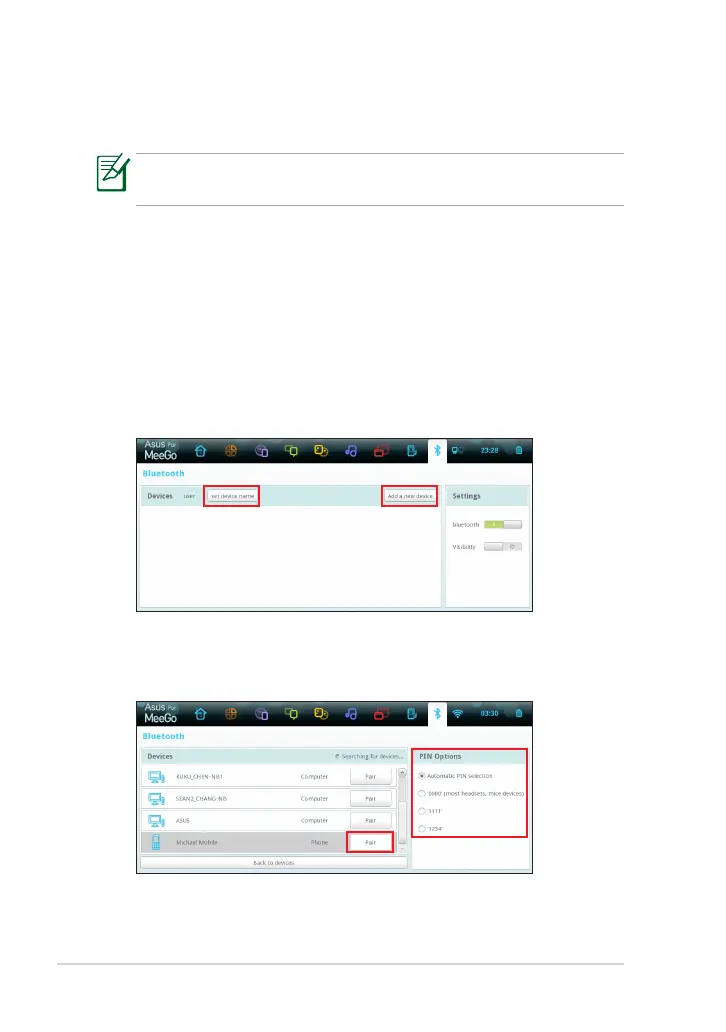
2. Click Bluetooth from the toolbar. To change the device name of your
Eee PC, click set device name. To connect to a new bluetooth device,
click Add a new device.
3. Your Eee PC will start searching bluetooth devices. Select a device
from the list, and then choose a PIN option that best suits the device
type. Click Pair.



 To Next Page