70
A Appendix
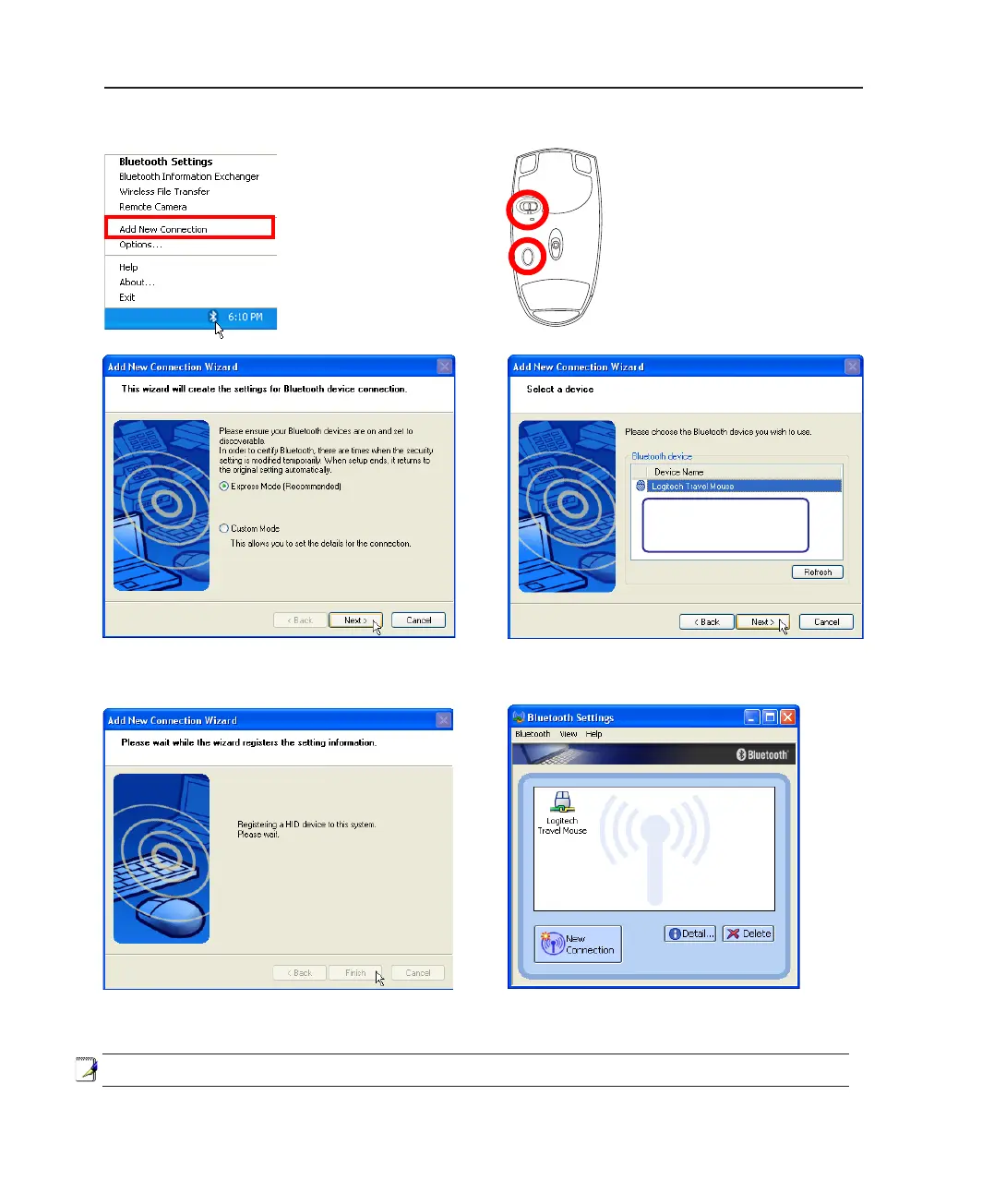
1. A Bluetooth icon
should be located on
your Windows taskbar.
Right click the taskbar
Bluetooth icon and
ch o o s e A d d N ew
Connection.
4. Select “Express Mode” and click Next.
3. Push the “RESET” button on
the bottom of the mouse.
2. Turn ON the switch on the
bottom of the mouse.
5. A list of available Bluetooth devices will appear.
Select “Logitech Travel Mouse” and click Next.
6. The software will register the Bluetooth mouse.
Click Finish when complete.
7. A mouse icon with a pair of green and
yellow hands will show in this window.
If you do not see the Bluetooth
mouse here. Push the “RESET”
button on the bottom of the
mouse and click Refresh here.
Note: “RESET” may be necessary after changing batteries. Repeat steps if necessary.
Bluetooth Mouse (optional)



 To Next Page