6. USB 2.0 ports 1 and 2. These two 4-pin Universal Serial Bus (USB) ports are for USB
2.0/1.1 devices.
7. USB 2.0 ports 3 and 4
. These two 4-pin Universal Serial Bus (USB) ports are for USB
2.0/1.1 devices.
8. D-Sub port.
This 15-pin port connects to a VGA monitor or other VGA-compatible
devices.
9. PS/2 Keyboard port.
This port connects to a PS/2 keyboard.
1.8.2 Internal connectors
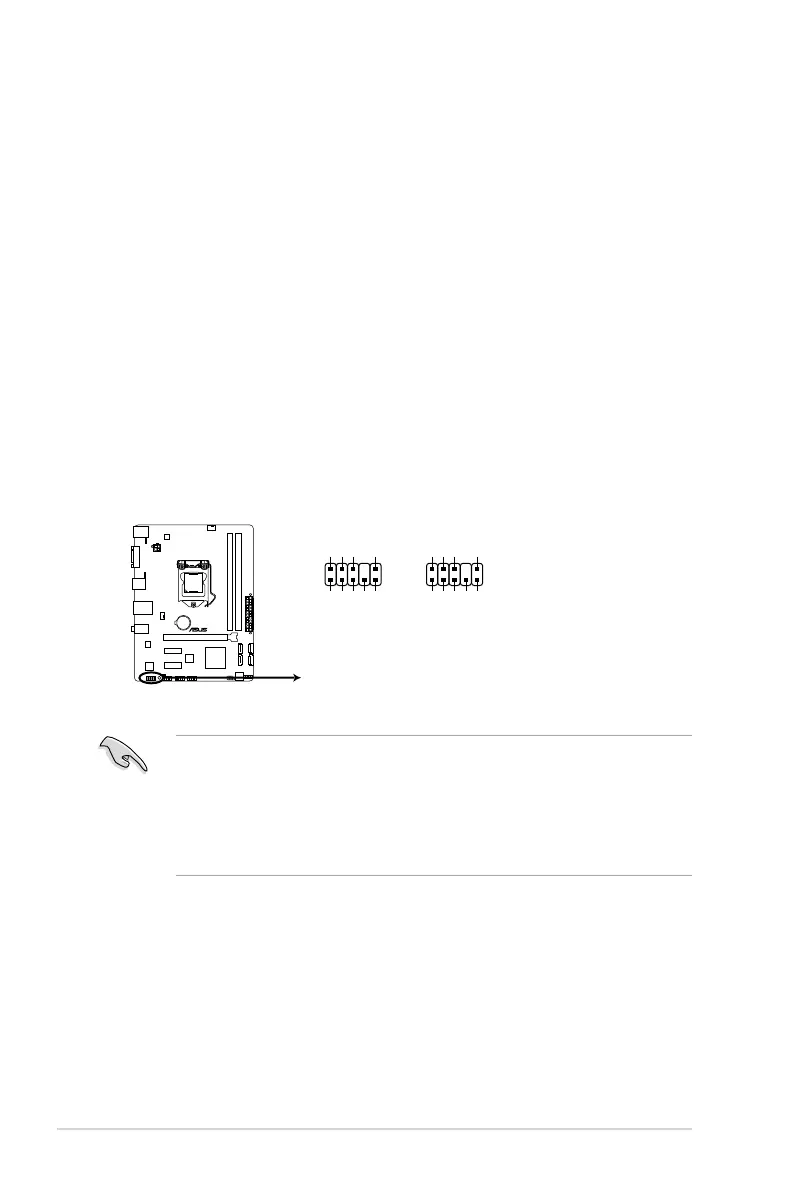
1. Front panel audio connector (10-1 pin AAFP)
This connector is for a chassis-mounted front panel audio I/O module that supports
either HD Audio or legacy AC`97 audio standard. Connect one end of the front panel
audio I/O module cable to this connector.
• We recommend that you connect a high-denition front panel audio module to this
connector to avail of the motherboard’s high-denition audio capability.
•
If you want to connect a high-denition front panel audio module to this connector,
set the Front Panel Type item in the BIOS setup to [HD]. If you want to connect an
AC'97 front panel audio module to this connector, set the item to [AC97]. By default,
this connector is set to [HD]. See section 2.5.6 Onboard Devices Conguration for
details.
H61M-E
H61M-E Front panel audio connector
AAFP
PIN 1
AGND
NC
SENSE1_RETUR
SENSE2_RETUR
PORT1 L
PORT1 R
PORT2 R
SENSE_SEND
PORT2 L
HD-audio-compliant
pin definition
PIN 1
AGND
NC
NC
NC
MIC2
MICPWR
Line out_R
NC
Line out_L
Legacy AC’97
compliant definition
Chapter 1: Product introduction
1-22



 To Next Page