Need help?
Do you have a question about the Asus HZ-3A and is the answer not in the manual?
Provides contact details and website links for additional product information and support.
Lists all items included in the docking station package for verification.
Details the necessary hardware and software specifications for operating the docking station.
Outlines the electrical specifications for the docking station's self-powered mode.
Describes the docking station's specifications when powered via the USB bus.
Lists supported video ports, aspect ratios, resolutions, and color depths.
Details the audio output and microphone input ports available on the docking station.
Covers network connectivity (Ethernet port) and security features (Kensington lock).
Describes the USB hub ports and the physical dimensions and weight of the docking station.
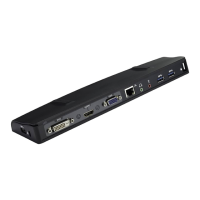
Illustrates and labels the ports and connectors on the rear of the docking station.
Shows and labels the ports and connectors on the right side of the docking station.
Displays and labels the ports and connectors on the left side of the docking station.
Step-by-step instructions for installing the necessary device drivers for the docking station.
Procedure for removing the docking station's drivers from the system.
Instructions on configuring multiple monitor displays with the docking station.
How to start the ASUS USB Docking Display Utility from the taskbar.
Utility feature for identifying connected display device IDs (VESA DDC/EDID, Generic).
How to select and adjust the screen resolution using the utility.
How to select display rotation settings (Landscape, Portrait) for supported devices.
Options for extending the Windows desktop across multiple monitors (Right, Left, Top, Bottom).
Configuration options for display modes: Extend, Duplicate, and Main display.
Procedure to disable or disconnect a display from the system.
Accessing Windows sound settings for audio output management.
Accessing Windows display resolution settings for configuration.
Displays the current version information of the docking station utility.
 General
| Brand | Asus |
|---|---|
| Model | HZ-3A |
| Category | Docking Station |
| Language | English |

 To Next Page