7
Powering your device
After charging the battery, you are now ready to use your device.
To power on your device:
1. Press and hold the power button to turn ON the device.
2. Follow the succeeding screen instructions to setup your Windows Mobile-based device.
The Today screen
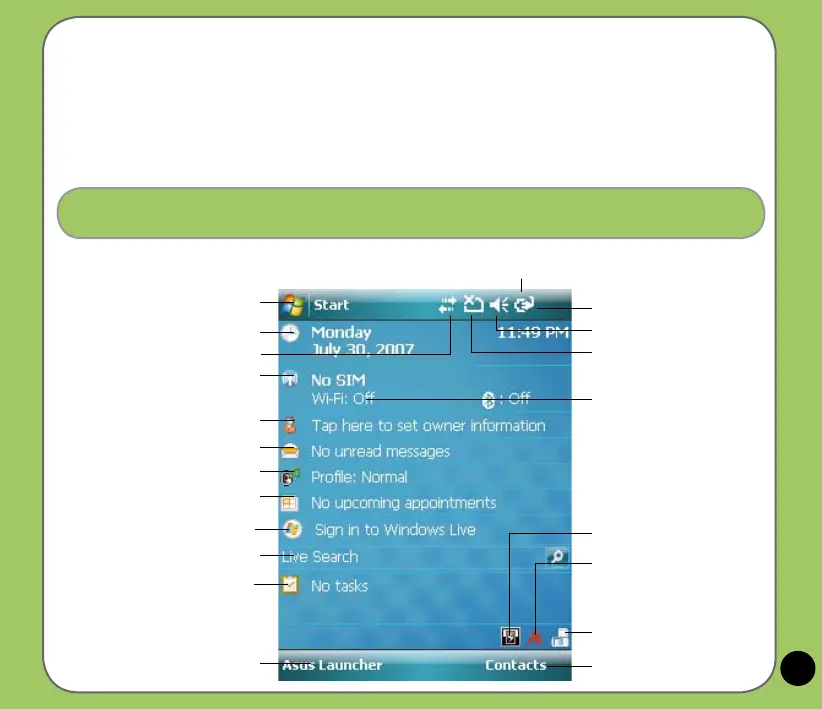
The Today screen displays information useful to you.
Tap to open the Start menu
Tap to setup date, time, and alarm.
Displays the current network
provider and connection status
Tap to input owner information
Tap to open messages
Tap to setup prole
Tap to read or make appointments
Tap to launch Live search engine
Tap to setup tasks
Tap to display ASUS Launcher
Indicates the battery status
Tap to adjust volume
Displays the signal status.
(The icon shows no SIM card and no signal
When no SIM card is installed.)
Tap to view connectivity status
Tap to display system device
storage, USB setting, LCD
brightness, battery, memory,
and MicroSD status
Tap to set Call Filter
Tap to launch Contacts list
Tap to change screen
orientation
Displays the Bluetooth
®
/ WiFi
connection status
Status bar
Tap to sign in Windows Live


 To Next Page