8
ASUS Status icon
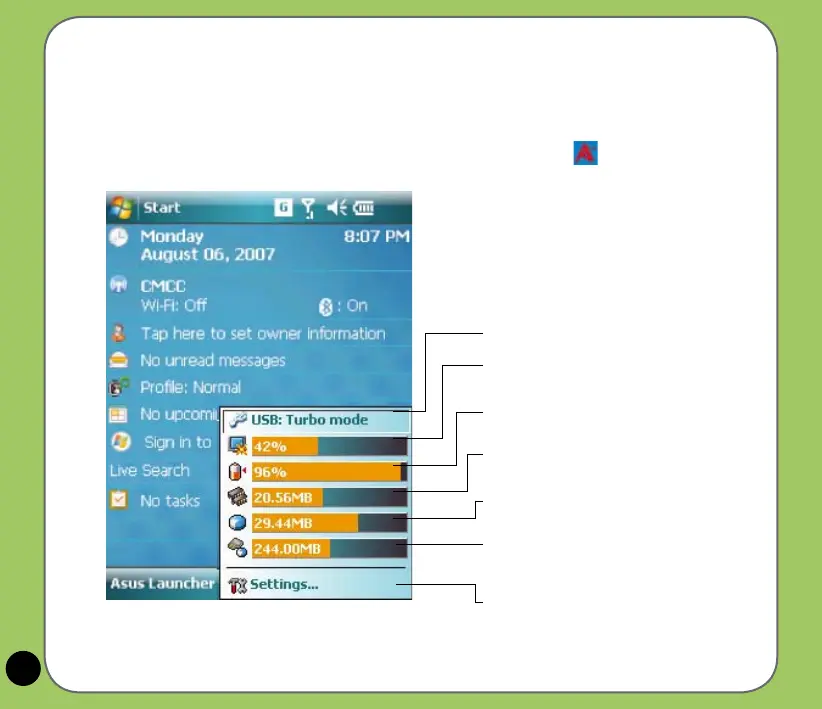
The ASUS status icon allows you to easily check and see the current status of the following
device components: CPU, USB, LCD brightness, Battery power, Memory, MicroSD card, and
device storage.
To check the status of these components, tap the ASUS Status icon on the Today screen.
USB: Allows you to set the USB connection mode.
Brightness: Tap to adjust the LCD brightness on
battery power or external power.
Power: Displays the remaining battery power and
allows you to set advanced power saving features.
Program Memory: Displays the total, currently
used, and remaining memory available.
Storage memory: Displays the total, currently
used, and remaining memory available.
MicroSD card: Tap to display the contents of the
MicroSD card installed. This item appears only
when a MicroSD card is installed
Settings: Allows you to select the items to display
in this ASUS Status pop-up menu.


 To Next Page