ASUS P5B-VM 1-33
4. JMicron JMB363
®
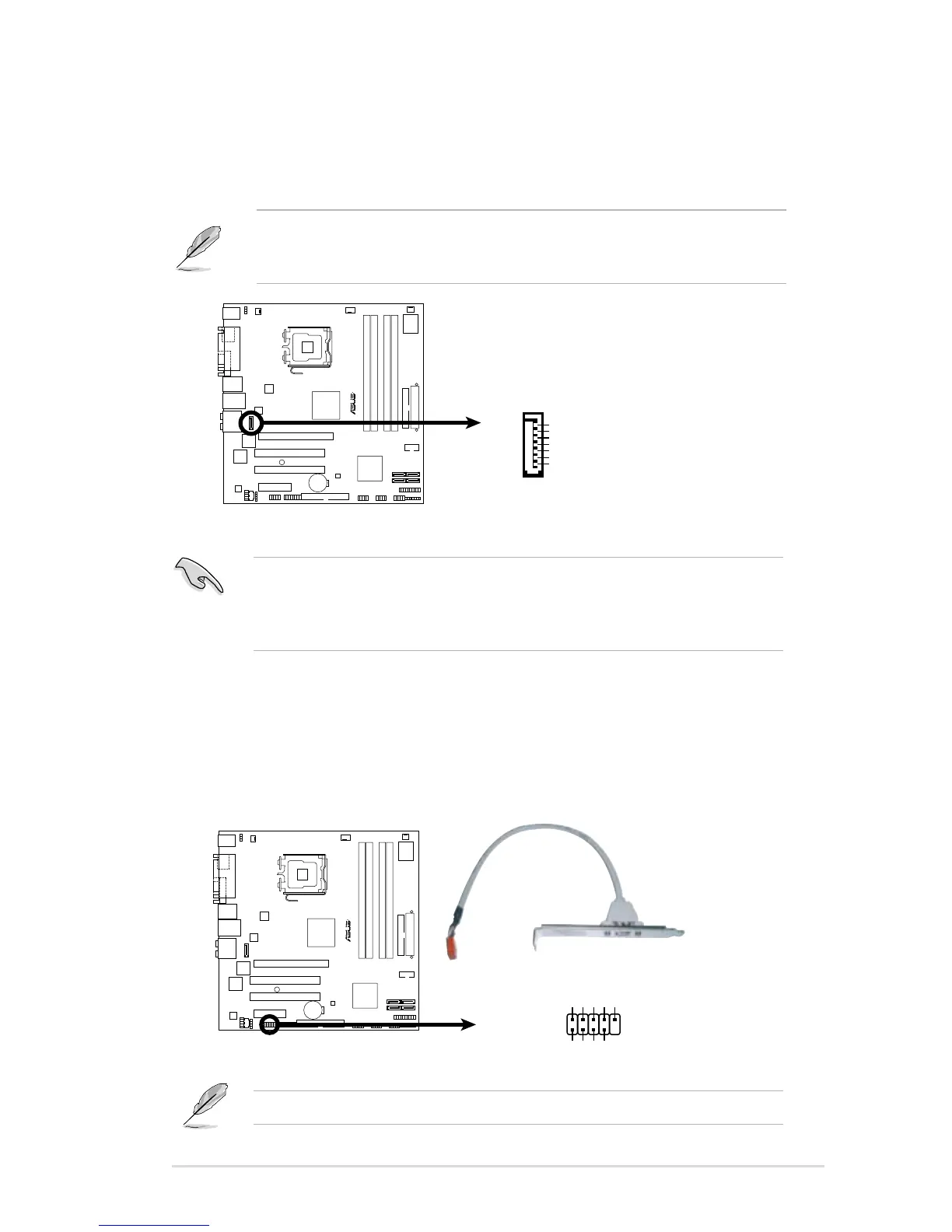
Serial ATA RAID connector (7-pin SATA_RAID)
This connector is for a Serial ATA signal cable. This connector supports
a Serial ATA hard disk drive that you can congure for RAID through the
onboard Serial ATA RAID controller.
The JMicron controller mode item in the BIOS is set to [AHCI] by default,
allowing you to use the connectors to build a RAID set. See section “2.4.5
Onboard Device Conguration” for details.
Before creating a RAID set using Serial ATA hard disks, make sure that you
have connected the Serial ATA signal cables and installed Serial ATA hard disk
drives; otherwise, you cannot enter the JMicron
®
JMB363 RAID utility and SATA
BIOS setup during POST.
5. IEEE 1394a port connector (10-1 pin IE1394_2)
This connector is for a IEEE 1394a port. Connect the IEEE 1394a module
cable to this connector, then install the module to a slot opening at the back
of the system chassis.







 To Next Page