ASUS P7P55D-E Premium 3-37
Chapter 3
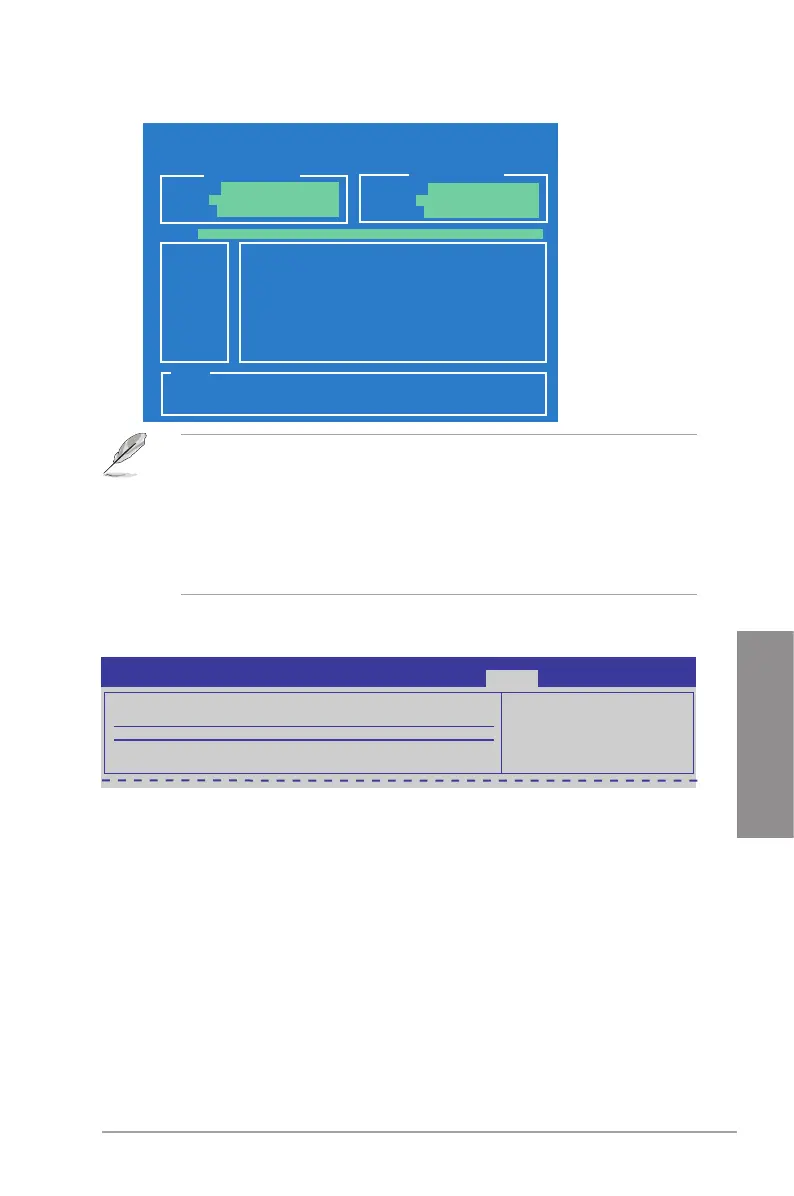
Current CMOS
Restore CMOS
A:
Note
[Enter] Select or Load [Tab] Switch [V] Drive Info
[Up/Down/Home/End] Move [B] Backup [Esc] Exit
PATH: A:\
BOARD: P7P55D-E Premium
VER: 0202
DATE: 07/23/2009
BOARD: Unknown
VER: Unknown
DATE: Unknown
ASUSTek O.C. Prole Utility V2.00b
• This function can support devices such as a USB ash disk with FAT 32/16 format and
single partition only.
• DO NOT shut down or reset the system while updating the BIOS to prevent the
system boot failure!
• We recommend that you update the BIOS le only coming from the same memory/CPU
conguration and BIOS version.
• Only the CMO le can be loaded.
3.9.2 AI NET 2
Check Realtek LAN Cable [Disabled]
[Disabled] BIOS will not check the Realtek LAN cable during the Power-On Self-Test
(POST).
[Enabled] BIOS checks the Realtek LAN cable during the Power-On Self-Test
(POST).
AI NET 2
Pair Status Length
Check Realtek LAN cable [Disabled]
BIOS SETUP UTILITY
Tools
Check Realtek LAN
cable during POST.
It will take 3 to 10
seconds to diagnose
LAN cable.
3.9.3 ASUS EZ Flash 2
Allows you to run ASUS EZ Flash 2. When you press <Enter>, a conrmation message
appears. Use the left/right arrow key to select between [Yes] or [No], then press <Enter> to
conrm your choice. Check section 3.2.2 ASUS EZ Flash 2 utility for details.


 To Next Page