2-34 Chapter 2: Hardware information
Chapter 2
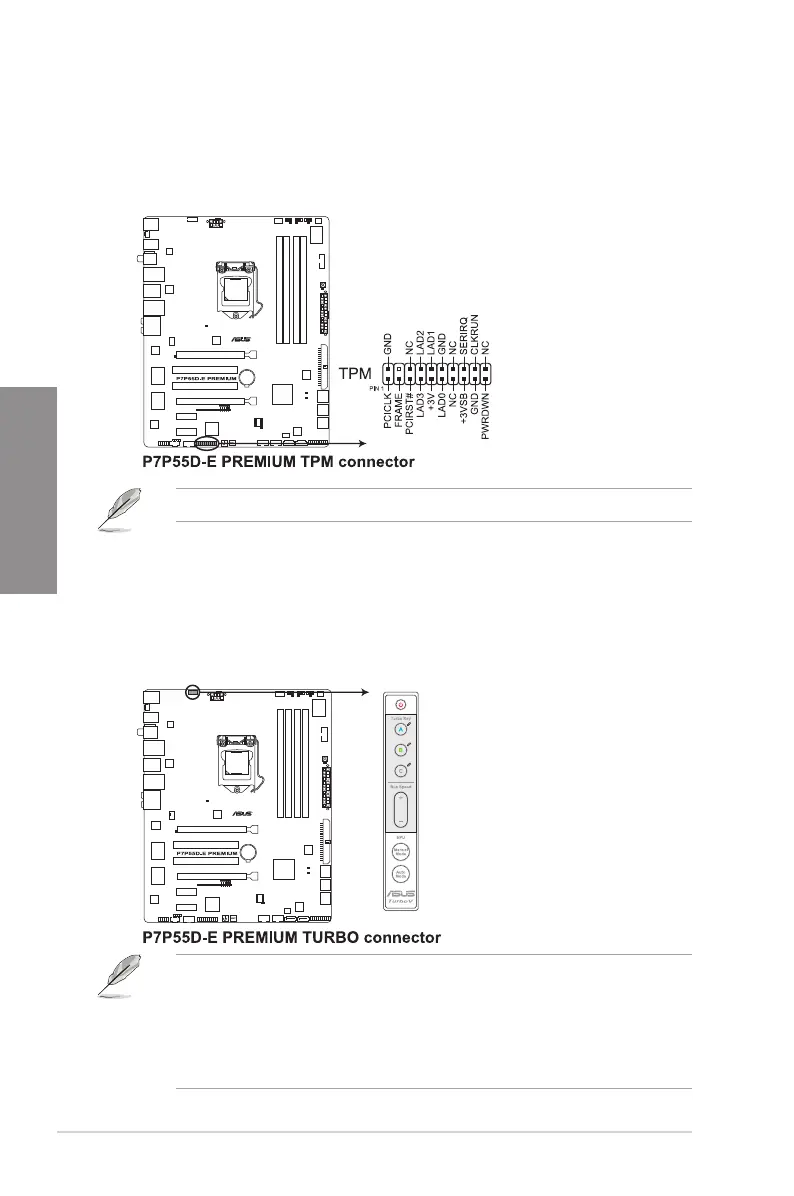
4. TPM connector (20-1 pin TPM)
This connector supports a Trusted Platform Module (TPM) system, which can securely
store keys, digital certicates, passwords, and data. A TPM system also helps enhance
network security, protects digital identities, and ensures platform integrity.
5. TurboV Remote connector (5-pin TURBO_CON)
This connector is for the bundled TurboV Remote. TurboV Remote allows you to turn
on/off the computer, adjust EPU modes and system bus speed, and launch Turbo Key
proles for system overclocking without interrupting on-going work or games. You can
also clear BIOS setup information by pressing the Clear CMOS key on the back of the
TurboV Remote.
• When removing TurboV Remote, rmly hold the connector to remove it. DO NOT force
or the cable will be broken.
• Ensure to install the TurboV Remote driver from the motherboard support DVD. Refer
to section
4.2 Support DVD information
for details.
• Refer to section
4.3.4 ASUS EPU-6 Engine
and
4.4 ASUS Unique Overclocking
Utlity—TurboV EVO
for related software details.
The TPM module is purchased separately.


 To Next Page