18
ASUS A7V User’s Manual
3. HARDWARE SETUP
3. H/W SETUP
Motherboard Settings
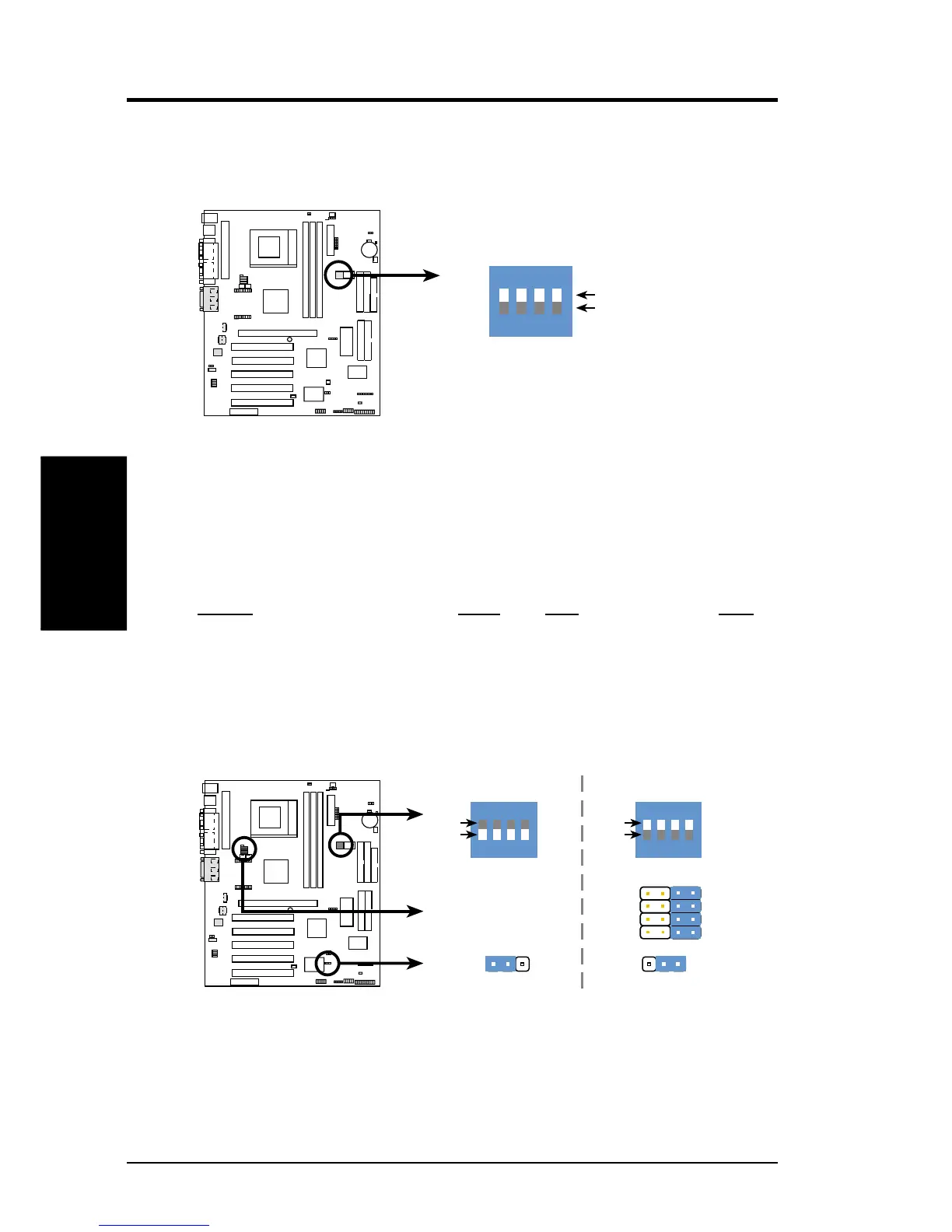
1) JumperFree™ Mode (JEN)
This jumper allows you to enable or disable the JumperFree™ mode. The
JumperFree™ mode allows processor settings to be made through the BIOS
setup (see 4.4 Advanced Menu).
Setting DSW VID JEN
Jumper Mode All ON (See Volt. Reg. Out.) [1-2]
JumperFree™Mode (Default) All OFF All [3-4] [2-3]
A7V Jumper Mode Settings
0 1
0 1
0 1
A7PRO
JEN
VID2
VID3
VID1
VID4
3214
Jumper Mode
12
JumperFree Mode
(Default)
2
3
ON
ON
1
2
3
4
OFF
DSW
ON
ON
1
2
3
4
OFF
DSW
See Voltage Reg.
Out. (VID)
JEN
Motherboard Features Settings (DIP Switches - DSW)
The motherboard’s onboard functions are adjusted through the DIP switches. The
white block represents the switch’s position. The example below shows all the
switches in the OFF position.
1. Frequency Selection
2. Frequency Selection
3. Frequency Selection
4. Frequency Selection
A7V DIP Switches
ON
OFF
DSW
0 1
0 1
0 1
A7PRO
ON
12
34









 To Next Page