ASUS A7V User’s Manual 21
3. HARDWARE SETUP
3. H/W SETUP
Motherboard Settings
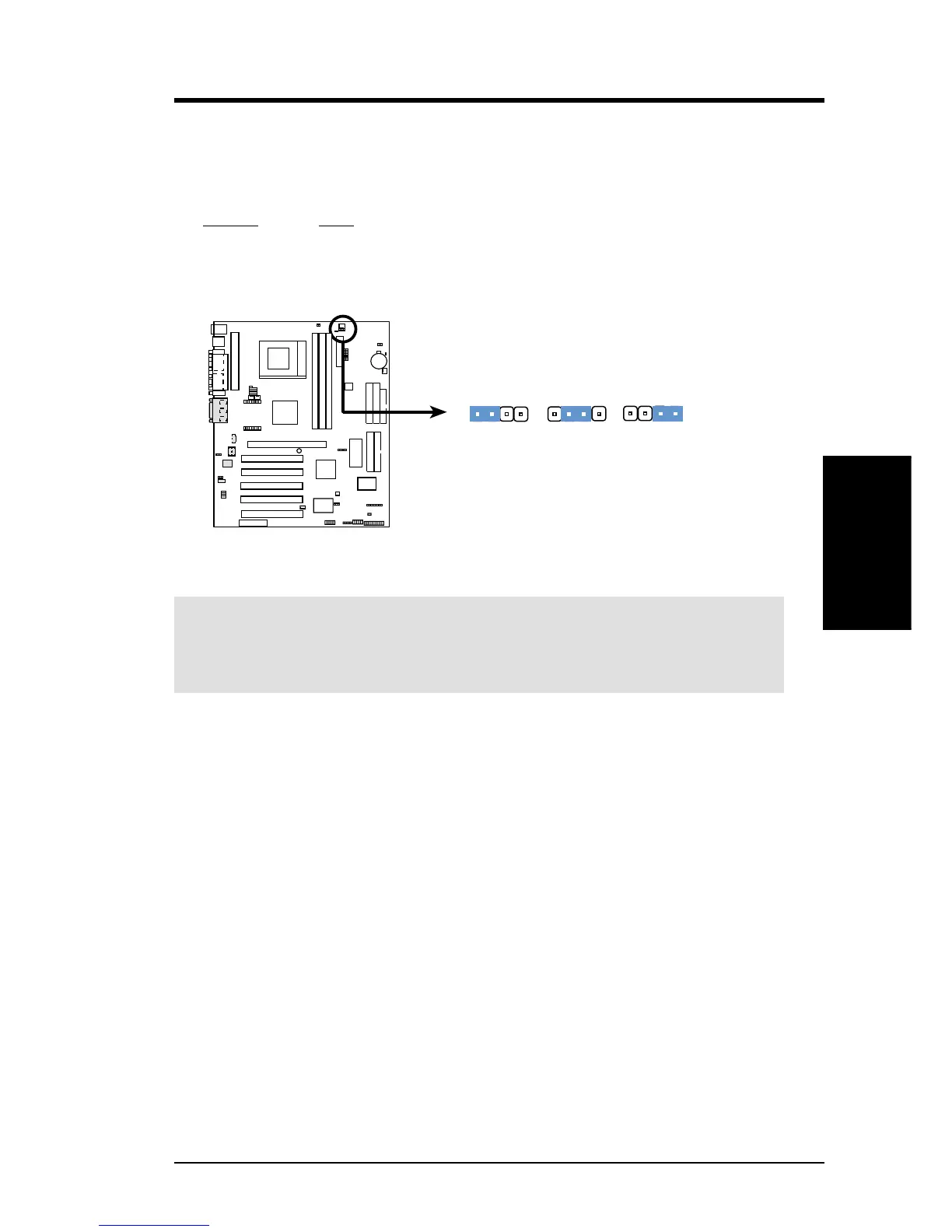
4) I/O Voltage Setting (VIO)
VIO allows you to select the voltage supplied to the DRAM, chipset, AGP, PCI,
and the CPU’s I/O buffer. The default voltage (3.56V) should be used unless
processor overclocking requires a higher voltage.
Setting VIO
3.35 Volt [1-2]
3.56 Volt [2-3] (default)
3.69 Volt [3-4]
A7V VIO Setting
3.35 Volt 3.69 Volt
12
2
3
VIO
3.56 Volt
(Default)
3
4
0 1
0 1
0 1
A7V
WARNING! Using a higher voltage may help when overclocking but may re-
sult in the shortening of your computer component’s life. It is strongly recom-
mended that you leave this setting on its default.









 To Next Page