ASUS A7V User’s Manual 35
3. HARDWARE SETUP
Connectors
3. H/W SETUP
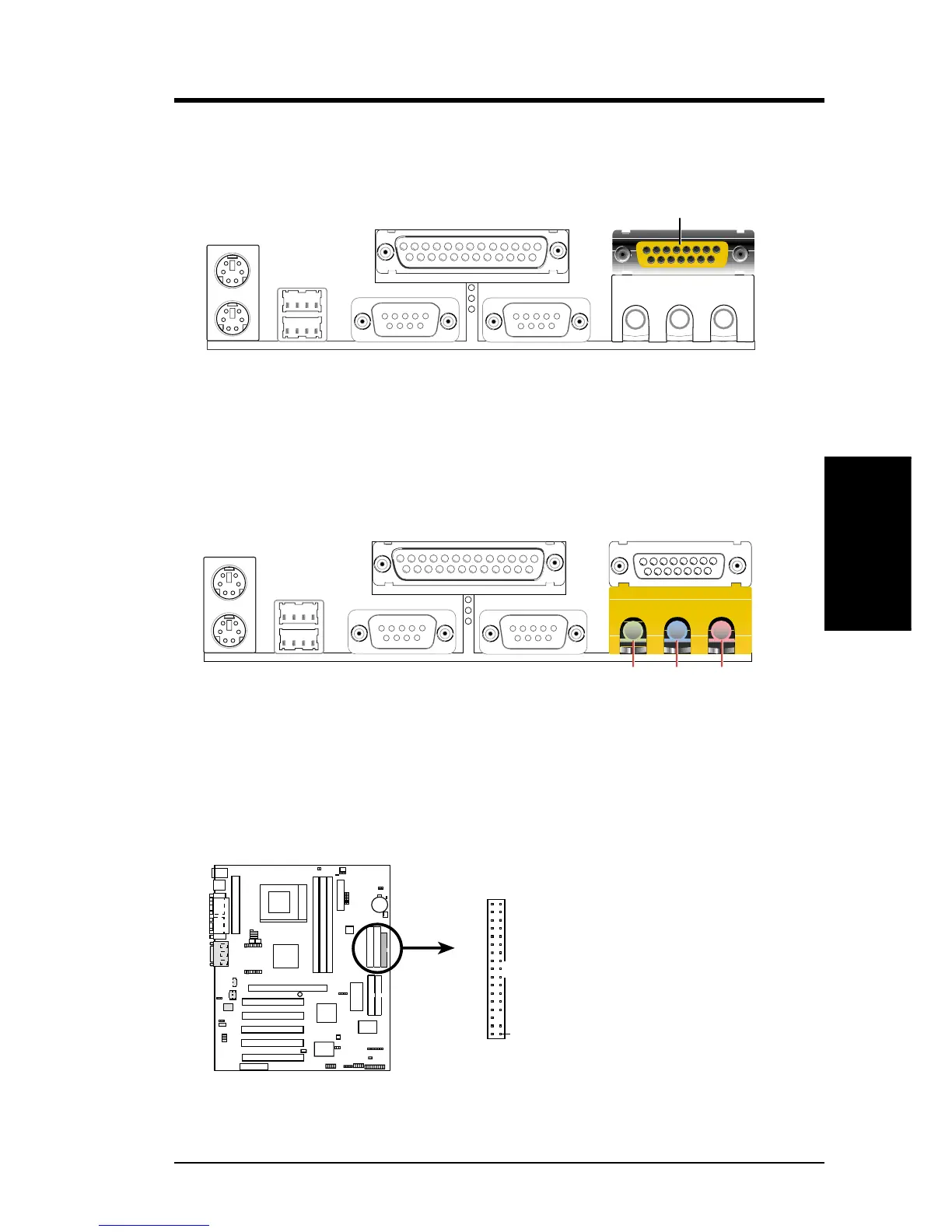
7) Audio Port Connectors (Three 1/8” GAME_AUDIO) (optional)
Line Out (lime) can be connected to headphones or preferably powered speak-
ers. Line In (light blue) allows tape players or other audio sources to be re-
corded by your computer or played through the Line Out (lime). Mic (pink)
allows microphones to be connected for inputting voice.
MicLine InLine Out
1/8" Stereo Audio Connectors
6) Game/MIDI Connector (Gold 15-pin GAME_AUDIO) (optional)
You may connect game joysticks or game pads to this connector for playing
games. Connect MIDI devices for playing or editing professional audio.
Game/MIDI (15-pin Female)
8) Floppy Disk Drive Connector (34-1 pin FLOPPY)
This connector supports the provided floppy drive ribbon cable. After connect-
ing the single end to the board, connect the two plugs on the other end to the
floppy drives. (Pin 5 is removed to prevent inserting in the wrong orienta-
tion when using ribbon cables with pin 5 plugged).
NOTE: Orient the red markings on
the floppy ribbon cable to PIN 1.
A7V Floppy Disk Drive Connector
PIN 1
FLOPPY
0 1
0 1
0 1
A7V









 To Next Page