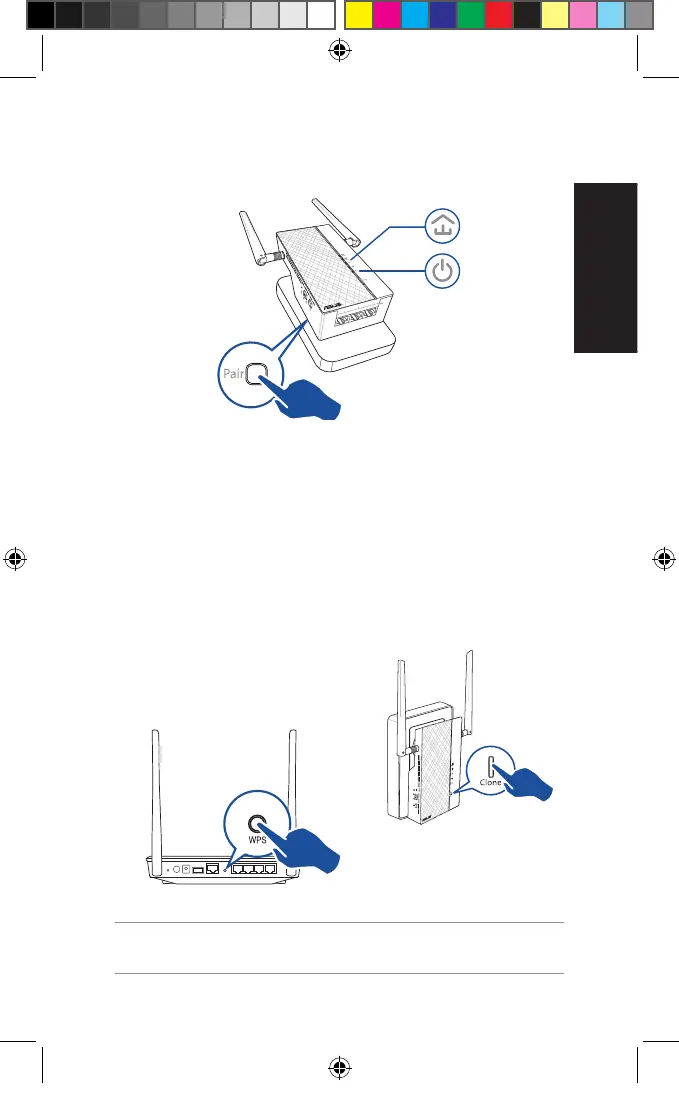
2. Press the Pair button on another extender or adapter. Wait
until the powerline LED lights up, indicating that pairing is
successful.
Conguring your PL-AC56 wireless settings
You can congure the wireless settings of your PL-AC56 via its Wi-Fi
Clone function or via its web interface.
Conguring via Wi-Fi Clone
Use your router’s wireless network name and password to cong-
ure your PL-AC56 settings.
1. Place your PL-AC56 next
to your router, and turn
both devices on.
2. Press the WPS button on
your router.
3. Press the Clone button on
your PL-AC56.
4. Your PL-AC56 and your
router now have the same
wireless network name
and password.
NOTE: If Wi-Fi Clone succeeds, move your PL-AC56 to your preferred
location. If it fails, follow the steps in Conguring via the web interface.
Blinking
On
U11264_PL-AC56_Kit_QSG_Booklet_105x170mm.indb 7 2016-02-04 10:04:50



 To Next Page