1-8
Chapter 1: Product introduction
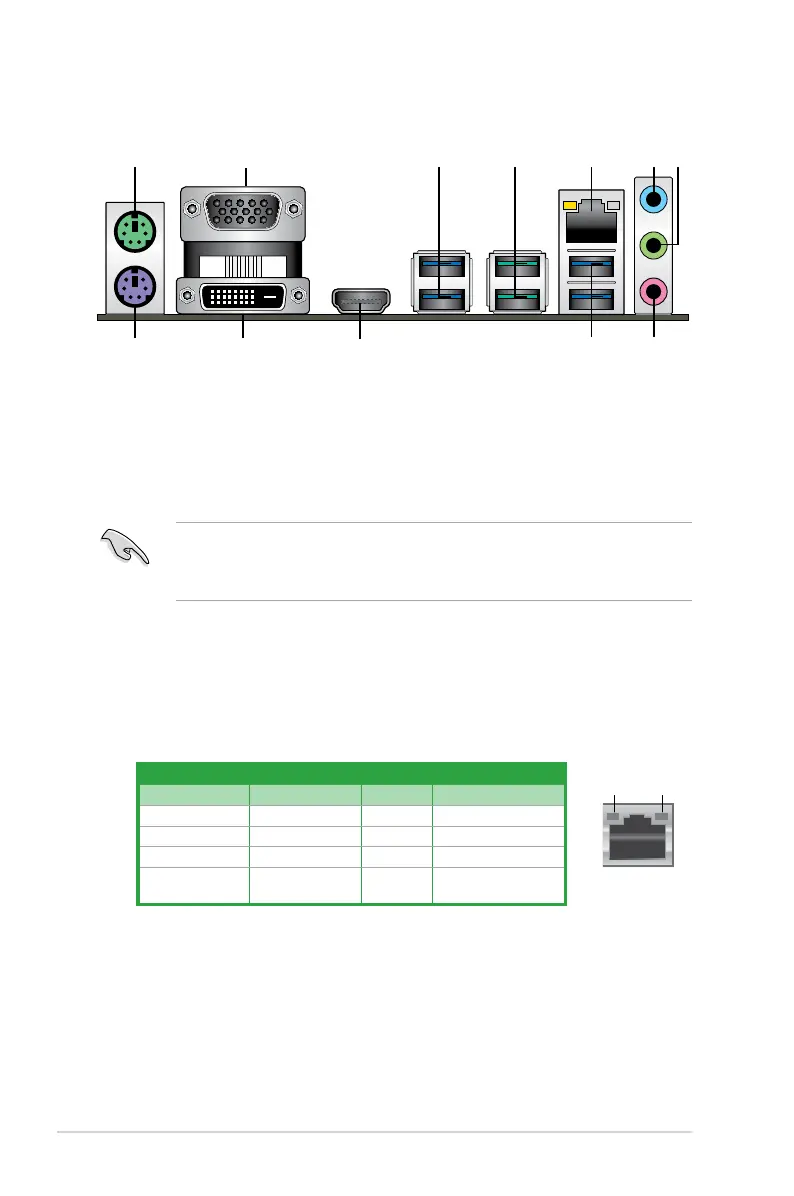
1.2.2 Rear panel connectors
1. PS/2 mouse (green).ThisportisforaPS/2mouse.
2. Video Graphics Adapter (VGA) port.This15-pinportisforaVGAmonitororother
VGA-compatibledevices.
3. USB 3.1 Gen 1 ports.Thesefour9-pinUniversalSerialBus(USB)portsconnectto
USB3.1Gen1devices.
• USB3.1Gen1devicescanonlybeusedfordatastorage.
• DuetothedesignoftheAMDAM4serieschipset,allUSBdevicesconnectedtothe
USB2.0andUSB3.1Gen1portsarecontrolledbythexHCIcontroller.
4. USB 3.1 Gen 2 ports (teal blue, Type A).These9-pinUniversalSerialBus3.1(USB
3.1Gen2)portsareforUSB3.1Gen2devices.
LAN port
Speed
LED
Activity Link
LED
Activity/Link LED Speed LED
Status Description Status Description
Off Nolink OFF 10Mbpsconnection
Orange Linked ORANGE 100Mbpsconnection
Orange(Blinking) Dataactivity GREEN 1Gbpsconnection
Orange(Blinking
thensteady)
Readytowake
upfromS5mode
LAN port LED indications
5. LAN (RJ-45) port.ThisportallowsGigabitconnectiontoaLocalAreaNetwork(LAN)
throughanetworkhub.RefertothetablebelowfortheLANportLEDindications.






 To Next Page