
 Need help?
Do you have a question about the Asus PRIME Z490M-PLUS and is the answer not in the manual?
Precautions to prevent electrical hazards and ensure safe operation of the system.
Guidelines for safe handling and operation of the motherboard and system components.
General introduction to the PC building process and motherboard installation.
Detailed instructions and precautions for installing the CPU correctly.
Guide for installing CPU heatsinks, fans, and AIO coolers.
Instructions for installing DDR4 memory modules into the DIMM slots.
Guide for installing M.2 SSD modules into the M.2 slots.
Steps for installing the motherboard into the PC chassis.
Instructions for connecting the ATX power supply to the motherboard.
Guide for connecting SATA storage devices like HDDs and SSDs.
Instructions for connecting front panel connectors for USB, audio, and power buttons.
Guide for installing PCIe expansion cards like graphics cards.
Steps for initial power-on, POST, and troubleshooting BIOS beep codes.
Introduction to the ASUS UEFI BIOS, its interface, and general settings.
Guide on how to enter and navigate the BIOS setup utility.
Instructions for updating the BIOS using the ASUS EZ Flash 3 utility.
Explanation of RAID levels (0, 1, 5, 10) and their configurations.
 General
| Audio chip | Realtek ALC887 |
|---|---|
| Component for | PC |
| Motherboard chipset | Intel Z490 |
| Audio output channels | 8 channels |
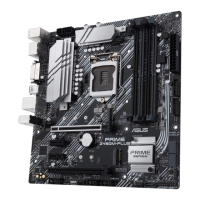
| Motherboard form factor | micro ATX |
| Motherboard chipset family | Intel |
| Windows operating systems supported | Windows 10 |
| Cables included | SATA |
| Wi-Fi | No |
| Ethernet LAN | Yes |
| LAN controller | Intel® I219-V |
| Ethernet interface type | Gigabit Ethernet |
| BIOS type | UEFI AMI |
| BIOS memory size | 128 Mbit |
| USB 2.0 connectors | 2 |
| Number of COM connectors | 1 |
| Number of SATA II connectors | 0 |
| Number of SATA III connectors | 5 |
| HDMI version | 1.4b |
| DisplayPort version | 1.4 |
| USB 2.0 ports quantity | USB 2.0 ports have a data transmission speed of 480 Mbps, and are backwards compatible with USB 1.1 ports. You can connect all kinds of peripheral devices to them. |
| RAID levels | 0, 1, 5, 10 |
| Number of HDDs supported | 7 |
| Supported storage drive types | HDD & SSD |
| Supported storage drive interfaces | SATA III |
| Maximum resolution | 4096 x 2304 pixels |
| Parallel processing technology support | 2-Way CrossFireX |
| Memory channels | Dual-channel |
| Memory slots type | DIMM |
| Number of memory slots | 4 |
| Supported memory types | DDR4-SDRAM |
| Maximum internal memory | 128 GB |
| Supported memory clock speeds | 2133, 2400, 2666, 2800, 2933, 3000, 3200, 3300, 3333, 3400, 3466, 3600, 3733, 3866, 4000, 4133, 4266, 4400 MHz |
| Processor socket | LGA 1200 (Socket H5) |
| Compatible processor series | Intel Celeron, Intel Core i3, Intel Core i5, Intel Core i7, Intel Core i9, Intel Pentium |
 Weight and Dimensions
| Width | 244 mm |
|---|






 To Next Page