4
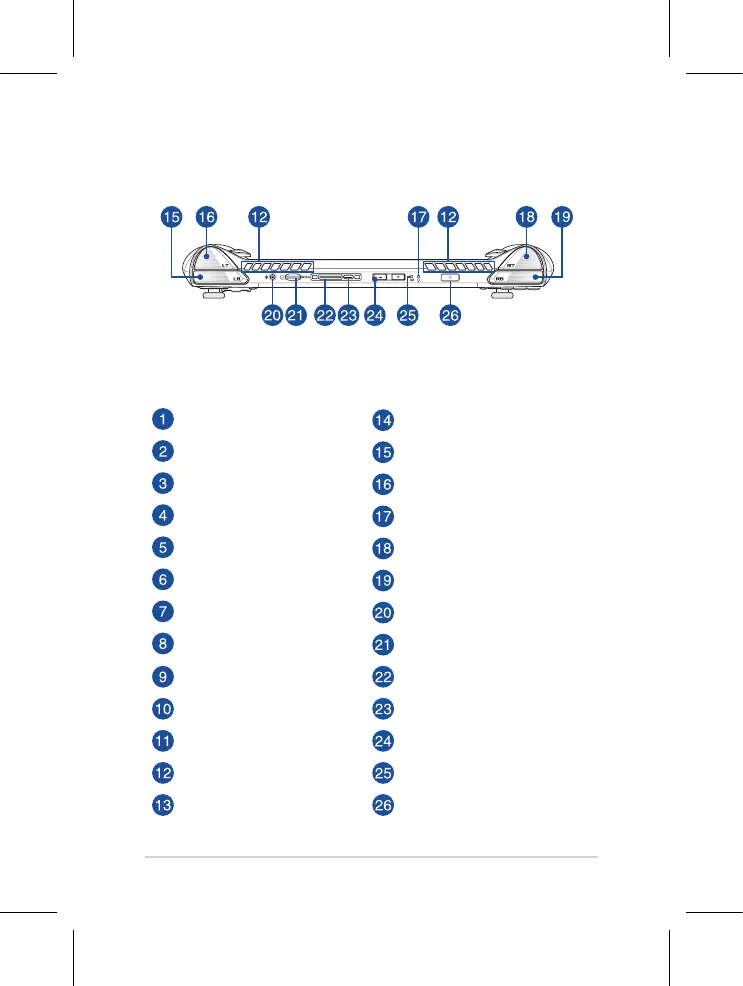
Left stick Macro 2 button
Directional buttons Left bumper
Audio speakers Left trigger
Array microphones Power indicator
View button Right trigger
Command Center button Right bumper
Armoury Crate button Headphone/Headset/Microphone jack
Menu button
MicroSD card slot
(supports up to UHS-II)
A/B/X/Y buttons ROG XG Mobile interface
Right stick
USB 3.2 Gen 2 Type-C®/DisplayPort 1.4/
Power (DC) input combo port
Touch screen Volume buttons
Air vents Two-color battery charge indicator
Macro 1 button Power button/Fingerprint sensor
Top View


 To Next Page