EasyManua.ls Logo

Asus RP-AX58 - User Manual

Asus RP-AX58
2 pages
Print Icon
To Next Page IconTo Next Page
Loading...
Placing your RP-AX58
Plug your RP-AX58 into a power outlet near
your router/AP.
Check the LEDs and see the LED explanations.
METHOD 1
Download the ASUS Extender App
and follow the onscreen instructions
METHOD 2
Connect via WPS
Press the WPS button on your router/
AP.
Press the WPS button on your
RP-AX58 for more than two (2)
seconds until the LED starts to
blink blue.
RP-AX58
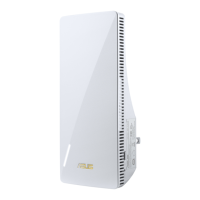
AX3000 Dual-Band WiFi Range
Extender
Quick
Start Guide
Hardware Explanations
Button Explanations
RESET BUTTON
Reset the system to its factory
default settings.
WPS BUTTON
Launch the WPS Wizard.
LAN PORT
Connect your PC to the LAN
port with a network cable.
BEFORE SETUP
SETUP METHODS
WE SUGGEST…
Set up RP-AX58 as a WiFi range extender
Plug RP-AX58 into a power outlet.
2
The LED will start breathing white for 3 seconds while booting up.
LAN port
LED
WPS button
reset button
LED Explanations
WiFi Range Extender Mode
Status LED Behavior
Booting up Blinking White
Booting up complete (not connected to
Router)
Solid Blue
Reset (use a pin to press the reset
button for 5 seconds)
Blinking Yellow
Rescue mode Solid Purple
Starting WPS Blinking Blue
Connected to the router with Good
Signal
Solid White
Connected to the router with Weak
Signal
Solid Yellow
No Signal Solid Red
AP mode (with wired connection) Solid White
AP mode (without wired connection) Solid Red
Wait for the LED to flash and turn solid blue,
indicating that your RP-AX58 is ready to connect
to your existing router/AP.
around
2 meters
3
If you would like to connect RP-AX58 to other WiFi networks excluding AiMesh-supported routers, please download the
ASUS Extender App or set up with the WPS button.
1 2
01
1 2
To minimize interference, keep the routers away from
devices like cordless phones, Bluetooth devices and
microwave ovens.
We recommend that you place the routers in an open or
spacious location.
NOTES:
AiMesh Mode
Status LED Behavior
Booting up Blinking White
Booting up complete (not connected to
AiMesh Router)
Solid Blue
Reset (use a pin to press the reset
button for 5 seconds)
Blinking Yellow
Rescue mode Solid Purple
Connecting to the AiMesh Router Blinking Blue
Connected to the AiMesh Router with
Good Signal
Solid White
Connected to the AiMesh Router with
Weak Signal
Solid Yellow
No Signal Solid Red
Ethernet backhaul Solid White
1
Question and Answer IconNeed help?

Do you have a question about the Asus RP-AX58 and is the answer not in the manual?

Summary

Hardware and Button Explanations

Button Functions

Details the functions of WPS, Reset buttons, and the LAN port on the RP-AX58.

LED Status Indicators

Explains LED behaviors for WiFi Range Extender and AiMesh modes.

Setup Preparation

RP-AX58 Placement Guide

Instructions for plugging in and positioning the RP-AX58 near your router.

Setup Methods

WiFi Range Extender Setup

Guides for connecting RP-AX58 to WiFi networks using the ASUS Extender App or WPS.

AiMesh Node Setup

Instructions for setting up RP-AX58 as an AiMesh node using the ASUS Router App.

Troubleshooting

AiMesh Connection Issues

Steps to resolve problems if the AiMesh router cannot find or sync with the RP-AX58.

Frequently Asked Questions

Wired Connection (Ethernet Backhaul)

Information on setting up wired connections between AiMesh routers and nodes.

Access Point (AP) Mode Setup

Guidance on configuring the RP-AX58 to operate in Access Point mode.

Regulatory and Safety Information

FCC and ISED Compliance

Details on compliance with FCC and Innovation, Science and Economic Development Canada regulations.

RF Exposure Compliance

Information regarding radio frequency exposure limits and safe operating distances.

Safety Precautions

Important safety notices for using the product, including environmental and handling guidelines.

Asus RP-AX58 Specifications

General IconGeneral
TypeNetwork transmitter
Mac compatibilityYes
Ethernet LAN data rates10, 100, 1000 Mbit/s
Maximum transfer distance- m
Windows operating systems supportedWindows 10, Windows 10 x64, Windows 11, Windows 7, Windows 8, Windows 8.1
Antenna typeInternal
Antennas quantity2
Ethernet LAN (RJ-45) ports1
Product colorWhite
Quantity per pack1 pc(s)
Wi-Fi bandDual-band (2.4 GHz / 5 GHz)
Wi-Fi standards802.11a, 802.11b, 802.11g, Wi-Fi 4 (802.11n), Wi-Fi 5 (802.11ac), Wi-Fi 6 (802.11ax)
Cabling technology10/100/1000Base-T(X)
Security algorithmsWPA-Enterprise, WPA2-Enterprise, WPS
Networking standardsIEEE 802.11a, IEEE 802.11ac, IEEE 802.11ax, IEEE 802.11b, IEEE 802.11g, IEEE 802.11n
Wi-Fi data rate (max)2400 Mbit/s
Weight and Dimensions IconWeight and Dimensions
Depth87 mm
Width72 mm
Height150 mm
Weight190 g

Videos

How to Set Up the ASUS RP-AX58 WiFi 6 Repeater

How to Reset the ASUS RP-AX58 WiFi 6 Repeater

Related product manuals