
 Need help?
Do you have a question about the Asus RS720-E7/RS12 and is the answer not in the manual?
Precautions to prevent electrical shock hazard during installation and operation.
Guidelines for safe server operation, handling, and environmental considerations.
Highlights the server's main capabilities like performance, storage, and expandability.
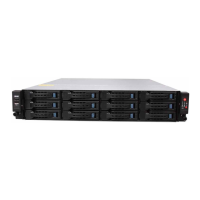
Illustrates and lists the major internal and external components of the server system.
Details the controls, indicators, and ports located on the server's front panel.
Describes the various ports and connectors found on the server's rear panel.
Provides comprehensive technical details, configurations, and metrics for the server.
Step-by-step instructions for installing or replacing the CPU and its associated heatsink.
Guide on how to install and configure DDR3 DIMM modules for system memory expansion.
Instructions for installing and connecting SAS/SATA hard disk drives into the server.
Procedure for installing expansion cards into the motherboard's PCI Express slots.
Detailed steps for the installation of the optional ASUS PIKE SAS RAID upgrade card.
Instructions for safely removing and installing the server's power supply modules.
Guide on how to install the friction rail kit for rack mounting the server.
Lists the operating systems officially supported by the server hardware.
 General
| Form Factor | 2U Rackmount |
|---|---|
| Drive Bays | 12 x 3.5" Hot-swap HDD Bays |
| Storage Type | SAS/SATA HDD/SSD |
| Storage Controller | Intel C602-A PCH |
| RAID Support | RAID 0, 1, 5, 10 |
| Networking | Dual Intel® I350 GbE LAN |
| Operating System Support | Windows Server, RedHat, SuSE, CentOS, VMware |
| Processor | Dual Intel® Xeon® processor E5-2600 v2 series (up to 130W) |










 To Next Page