Home
Asus
Network Router
RT-G32
Page 16
Asus RT-G32 - Page 16
44 pages
Manual
Save Page as PDF
To Next Page
To Next Page
To Previous Page
To Previous Page
Loading...
16
RT
-G32
Chapter 3: Conguring the clients
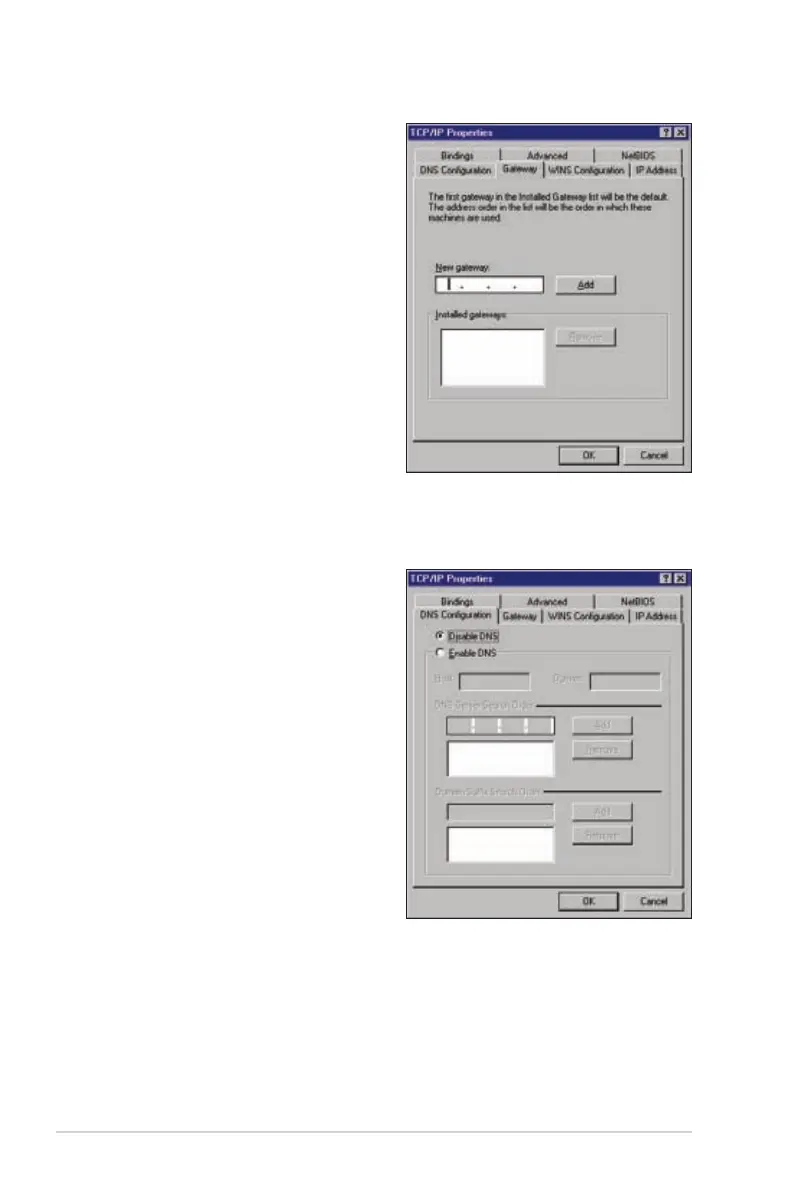
4.
Select
Gateway
tab, and key in
New gateway
then click
Add
.
5.
Select the
DNS conguration
tab
and click
Enable DNS
. Key in
Host
,
Domain
, and
DNS Server Search
Order
, then click
Add
.
6.
Click
OK
.
15
17
Other manuals for Asus RT-G32
Quick Start Guide
55 pages
Related product manuals
Asus RT-N11
47 pages
Asus RT-AC65
127 pages
Asus RT-N12+
101 pages
Asus RT-N18U
2 pages
Asus RT-N66R
76 pages
Asus RT-N13U
61 pages
Asus RT-AX92U
156 pages
Asus RT- N66U
3 pages
Asus RT-AC88U
135 pages
Asus RT-AC66U
131 pages
Asus RT-AC68R
129 pages
Asus RT-AC58U
124 pages


 To Next Page