Notebook PC E-Manual
75
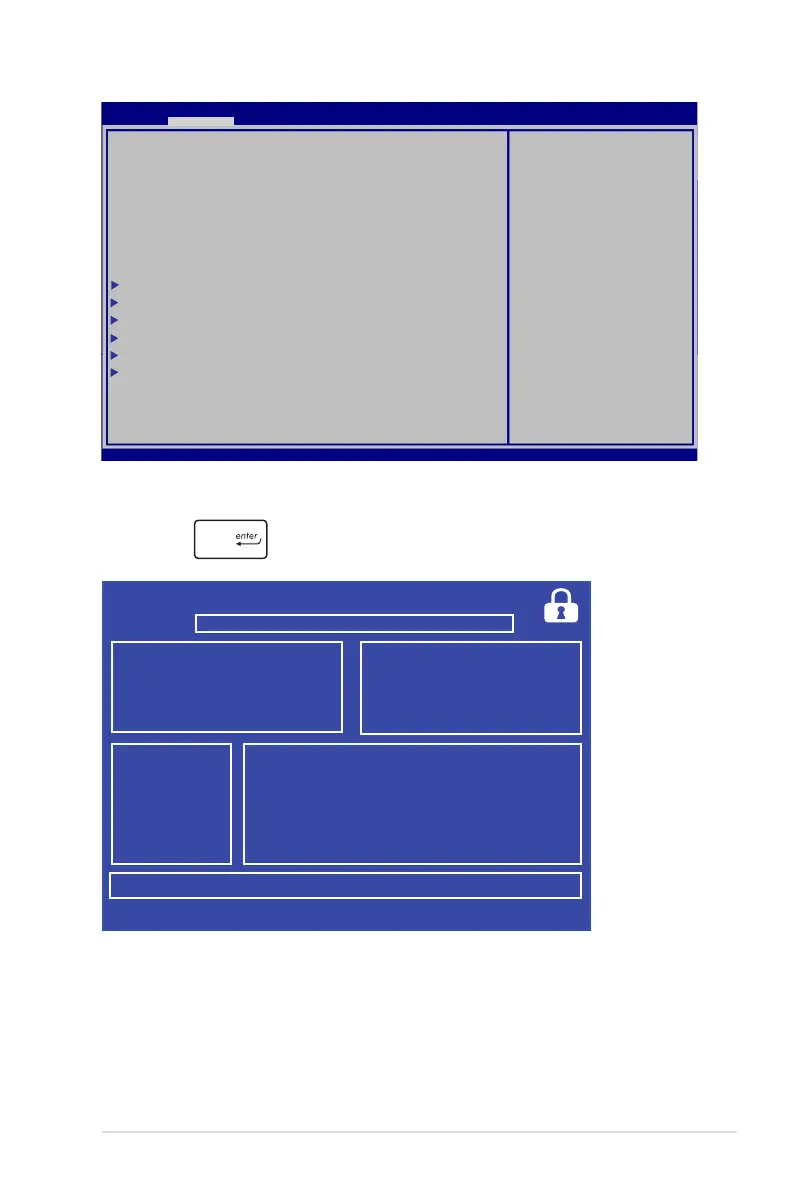
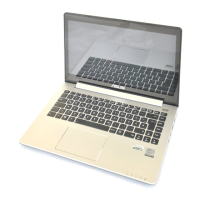
6. Locate your downloaded BIOS le in the ash disk drive then
press .
7. After the BIOS update process, select Exit > Restore Defaults to
restore the system to its default settings.
ASUSTek Easy Flash Utility
FSO
FS1
FS2
FS3
0 EFI <DIR>
[←→]: Switch [↑↓]: Choose [q]: Exit [Enter]: Enter/Execute
Current BIOS
Platform: X202E
Version: 100
Build Date: Jul 26 2012
Build Time: 11:09:58
New BIOS
Platform: Unknown
Version: Unknown
Build Date: Unknown
Build Time: Unknown
FLASH TYPE: Winbond 25X/Q Series
Aptio Setup Utility - Copyright (C) 2011 American Megatrends, Inc.
POST Logo Type [Static]
Start Easy Flash
Play POST Sound [No]
Speaker Volume [4]
Internal Pointing Device [Enabled]
Wake on Lid Open [Enabled]
ASUS USB Charger+ in battery mode [Disabled]
SATA Conguration
Graphics Conguration
DPTF Conguration
Intel (R) Anti-Theft Technology Corporation
USB Conguration
Network Stack
Press Enter to run the
utility to select and
update BIOS.
Aptio Setup Utility - Copyright (C) 2012 American Megatrends, Inc.
Main Advance Boot Security Save & Exit
→←
: Select Screen
↑↓
: Select Item
Enter: Select
+/— : Change Opt.
F1 : General Help
F9 : Optimized Defaults
F10 : Save & Exit
ESC : Exit
Version 2.15.1226. Copyright (C) 2012 American Megatrends, Inc.


 To Next Page