50
Notebook PC User Manual
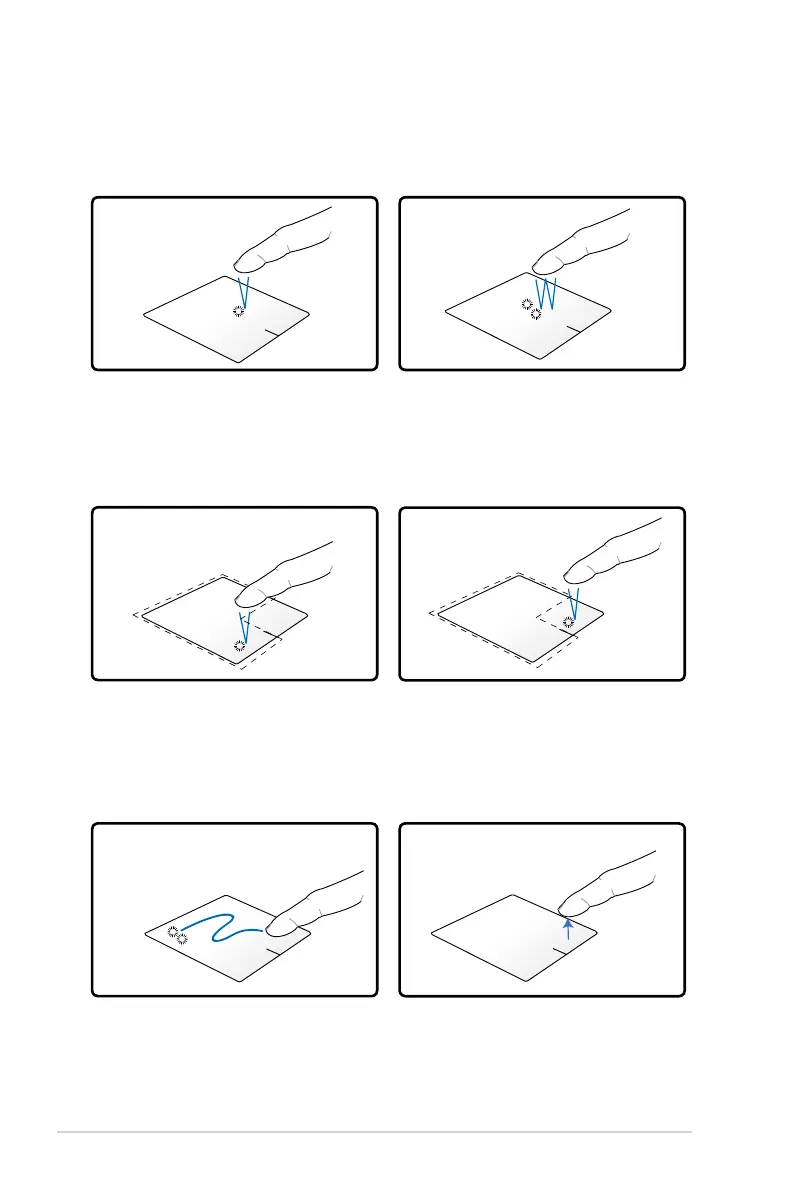
Tap once to select an item.
Touchpad usage illustrations
Tapping - Tapping on the touchpad allows you to select items onscreen
and open files.
Clicking - Clicking on the touchpad simulates the functions of the left
mouse button and right mouse button.
Dragging and dropping - Doing the drag-and-drop action on the
touchpad allows you to move onscreen items into a new location.
Click once to select an item,
then double-click to open.
Click once to select an item and
view its menu options.
Left click
Right click
Drag
Select an item by tapping twice,
then slide the same finger without
lifting it off the touchpad.
Release your finger from the
touchpad to drop the item on its
new location.
Drop
Tap twice to open the selected
item.


 To Next Page