EasyManua.ls Logo

Asus VH222 - User Manual

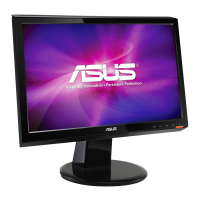
Asus VH222
23 pages
Print Icon
To Next Page IconTo Next Page
Loading...
LCD Monitor
User Guide
October 2008
E4240 V1
VH242/VH222 Series
Question and Answer IconNeed help?

Do you have a question about the Asus VH222 and is the answer not in the manual?

Summary

Notices

Federal Communications Commission Statement

Outlines FCC compliance requirements for the device's radio frequency emissions.

Canadian Department of Communications Statement

Details Canadian compliance standards for radio noise emissions from digital apparatus.

Safety Information

Care and Cleaning

Normal Monitor Symptoms

Explains common visual occurrences like screen flickering or temporary afterimages.

Conventions Used in Guide

Defines symbols for warnings, cautions, and important notes for user guidance.

Where to Find More Information

ASUS Websites

Directs users to the official ASUS website for product and software updates.

Optional Documentation

Mentions supplementary documents like warranty cards that may be included with the product.

Chapter 1: Product Introduction

Welcome!

A greeting and brief overview of the monitor's features and benefits.

Package Contents

Lists all items included in the LCD monitor package for user verification.

Assembling the Monitor Base

Provides step-by-step instructions for attaching the monitor stand to the base.

Connect Cables

Details the ports and required cables for connecting the monitor to a computer.

Monitor Front Panel Introduction

Describes the front panel controls and buttons of the LCD monitor.

Monitor Rear Panel Introduction

Identifies and explains the rear connectors and ports on the LCD monitor.

Chapter 2: Setup

Detaching the Arm;Stand for VESA Wall Mount

Instructions for removing the monitor stand to prepare for VESA wall mounting.

Adjusting the Monitor Angle

Guidance on tilting the monitor to achieve the most comfortable viewing angle.

Chapter 3: General Instruction

OSD Menu Navigation and Functions

Explains how to access and use the On-Screen Display (OSD) menu for settings.

Specifications Summary

Presents a detailed table of technical specifications for different monitor models.

Troubleshooting Common Issues (FAQ)

Provides solutions for common problems like power issues, screen display, and audio.

Supported Timing Lists

Lists supported VESA, IBM, MAC, and HDMI timing modes for optimal resolution.

Overview

The ASUS VH242/VH222 Series LCD Monitor is a widescreen display designed to provide a crisp, broad, and bright viewing experience, enhanced by a variety of features. This user guide outlines its functions, setup, and maintenance to help users maximize their visual experience.

Function Description

The monitor serves as a high-quality display for various computing and entertainment needs. It supports multiple input sources, including VGA, DVI, and HDMI (on some models), allowing for versatile connectivity with different devices such as PCs, gaming consoles, and media players.

A key feature of the monitor is its On-Screen Display (OSD) menu, which provides comprehensive control over display settings. Users can access the OSD menu to adjust image parameters, color settings, and system configurations. The OSD is navigated using dedicated buttons on the monitor's front panel, making it intuitive to use.

The monitor incorporates ASUS's SPLENDID™ Video Enhancement Technology, offering five preset video modes: Game Mode, Night View Mode, Scenery Mode, Standard Mode, and Theater Mode. These modes are optimized for different content types, automatically adjusting image characteristics like brightness, contrast, and color saturation to deliver the best possible visual quality for specific applications. For instance, Scenery Mode enhances outdoor photos, while Game Mode optimizes visuals for gaming.

Audio capabilities are also integrated into some models, featuring built-in satellite speakers (2W x 2 stereo) for an immersive audio experience. Additionally, certain models include Line-in, Earphone-out, and SPDIF Out ports, providing flexible audio connectivity options for external speakers, headphones, or home theater systems.

Usage Features

The monitor is designed for ease of use and adaptability to various user preferences.

  • Adjustable Stand: The monitor comes with a base that can be easily assembled and adjusted. Users can tilt the monitor's angle from -5° to 20° to find the most comfortable viewing position, helping to reduce strain during prolonged use.
  • VESA Wall Mount Compatibility: For users who prefer to mount their monitor on a wall or an adjustable arm, the VH242/VH222 Series is VESA wall mount compatible (100mm x 100mm). The arm/stand can be detached by removing three screws, allowing for flexible placement in any environment.
  • Hotkey Controls: The front panel features several hotkeys for quick access to frequently used functions:
    • Auto Adjustment (for VGA mode only): A dedicated button automatically optimizes the image's position, clock, and phase, ensuring a clear and stable display.
    • SPLENDID™ Modes: A hotkey allows users to cycle through the five SPLENDID™ video preset modes, instantly adapting the display to different content.
    • Volume Adjustment: On some models, a hotkey is available for quick volume control.
    • Brightness Adjustment: Another hotkey provides direct control over screen brightness.
    • Input Select: This hotkey enables users to switch between VGA, DVI, and HDMI input signals, simplifying the process of connecting multiple devices.
  • OSD Menu Navigation: The OSD menu is user-friendly, allowing users to fine-tune various display settings:
    • Image Settings: Adjustments for brightness, contrast, sharpness, saturation, position (H-Position and V-Position for VGA), and focus (Phase and Clock for VGA) are available. These controls allow users to customize the image to their exact preferences.
    • Color Settings: Users can select from various color temperature modes (Cool, Normal, Warm, sRGB, User Mode) and skin tone settings (Reddish, Natural, Yellowish). In User Mode, R, G, and B color values can be individually configured.
    • System Setup: This section includes options for OSD timeout, language selection (ten languages available), aspect ratio control (Full or 4:3), and monitor information display. A reset function allows users to revert all settings to their factory presets.
  • Power Management: The monitor features a power button to turn the display on or off, and a power indicator light (blue for ON, amber for standby) provides clear status feedback.

Maintenance Features

Proper care and maintenance are essential for ensuring the longevity and optimal performance of the ASUS VH242/VH222 Series LCD Monitor.

  • Cleaning: The monitor surface should be cleaned with a lint-free, non-abrasive cloth. For stubborn stains, a cloth dampened with a mild cleaner can be used. It is crucial to avoid cleaners containing alcohol or acetone, and never spray cleaner directly onto the screen to prevent liquid from dripping inside and causing electrical shock. Before cleaning, the monitor should be turned off and unplugged.
  • Handling: When lifting or repositioning the monitor, it is recommended to disconnect all cables and the power cord. Users should grasp the edges of the monitor and avoid lifting it by the stand or the cord to prevent damage.
  • Environmental Considerations: To protect the monitor from damage, it should be kept away from dust, humidity, and extreme temperatures. It should not be placed in areas where it might get wet and should always be on a stable surface. Adequate ventilation is necessary, so the ventilation slots on the back or top of the cabinet should not be blocked.
  • Power Supply: The monitor should only be operated from the type of power source indicated on its label. Using the appropriate power plug that complies with local standards is important. Overloading power strips and extension cords should be avoided to prevent fire or electric shock.
  • Protection from Surges: During lightning storms or when the monitor will not be used for an extended period, it is advisable to unplug the unit to protect it from power surges.
  • Troubleshooting Guidance: The manual provides a troubleshooting section (FAQ) to help users diagnose and resolve common issues such as no power, no screen image, incorrect image display (too light/dark, not centered, blurry, color defects), or no sound. This section offers practical solutions, including checking cable connections, adjusting OSD settings, and performing resets.
  • Professional Service: Users are advised not to attempt to open or repair the monitor cabinet themselves due to dangerous high voltages. If technical problems persist or if the power supply is broken, contacting a qualified service technician or retailer is recommended. The warranty may be voided if the product is repaired, modified, or altered without authorization from ASUS, or if the serial number is defaced or missing.

Asus VH222 Specifications

General IconGeneral
Pixel pitch0.248 x 0.248 mm
Display diagonal21.5 \
Vertical scan range50 - 75 Hz
Horizontal scan range30 - 83 kHz
Viewing angle, vertical160 °
Contrast ratio (typical)-
Viewing angle, horizontal170 °
Display brightness (typical)300 cd/m²
HDCPYes
RMS rated power4 W
CertificationUL/cUL, CB, CE, FCC, CCC, BSMI, Gost-R, C-Tick, VCCI, PSB, J-MOSS, RoHS, WEEE, WHQL
Product colorBlack
Cable lock slot typeKensington
Panel mounting interface100 x 100 mm
Power consumption (standby)2 W
Power consumption (typical)55 W
Package weight7400 g
Sustainability certificatesENERGY STAR
Cables includedDVI, VGA
Weight and Dimensions IconWeight and Dimensions
Depth (with stand)220 mm
Width (with stand)515 mm
Height (with stand)331 mm
Weight (with stand)4900 g

Related product manuals